Project Summary
Panorama's Student Success product empowers educators and administrators to transform Student Information System (SIS) data into actionable insights using the MTSS and PBIS frameworks. This enables precise, data-driven decision-making and comprehensive student support.
Following a competitive analysis in early 2021, Panorama's Business Development team identified a critical gap: existing tools do not offer educators a complete overview of student behavior within their domains.
Panorama embarked on a mission to create an innovative behavior management solution, dedicated to equipping educators with a comprehensive toolset. This initiative strives to enhance educators' understanding of behavior trends and empower them with effective strategies to address behavioral challenges.
My Role
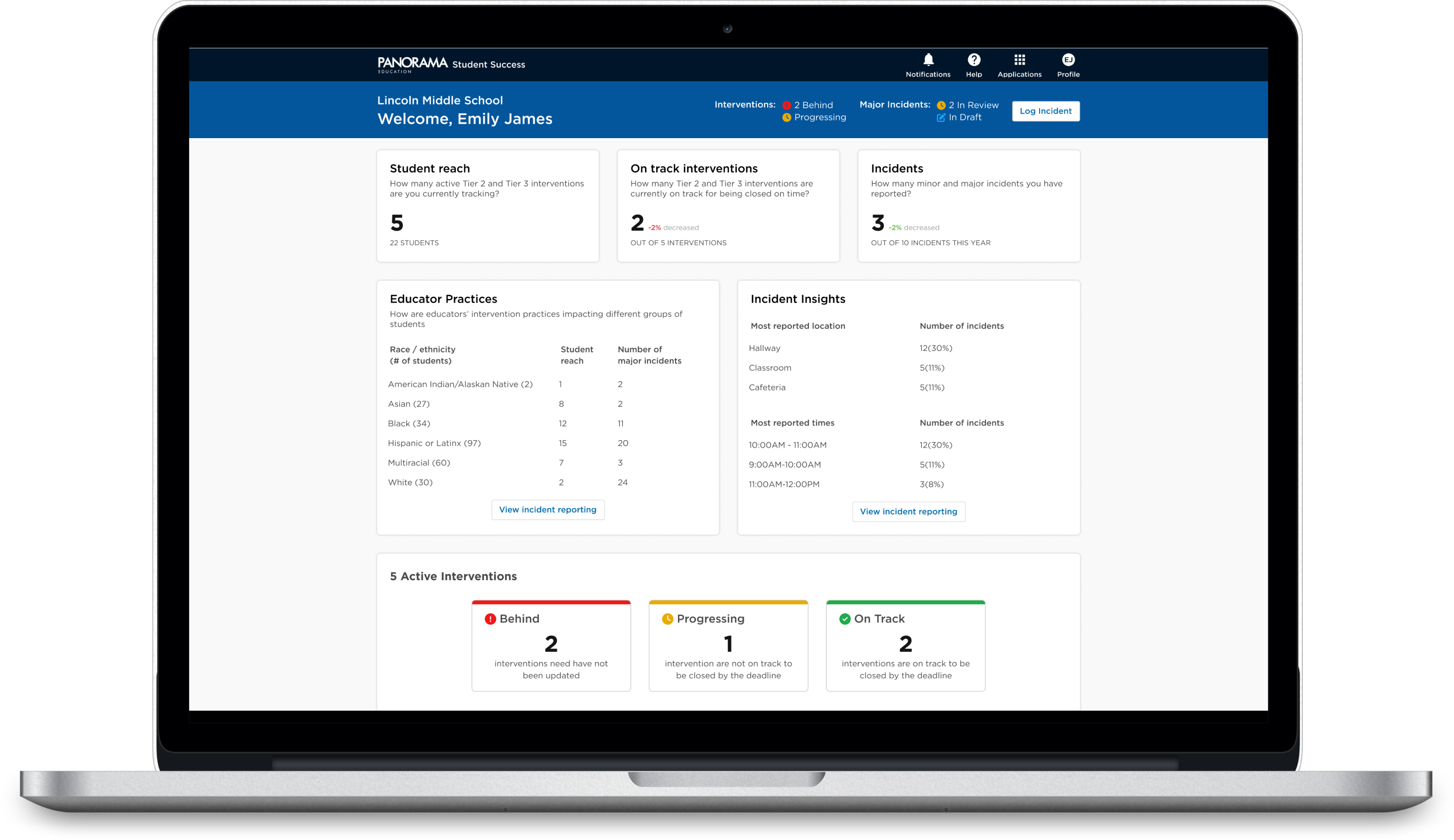
As one of the first hires for a new product line, I served as design strategist and lead, guiding the project from inception to release and beyond. Collaborating with Product Managers, Data Scientists, Academic Specialists, and Engineers, we developed three role-based insight dashboards and a comprehensive incident record form within a year. I also supported team growth, onboarding and mentoring, expanding from 2 inital product hires to 3 product managers, 1 additional designer, and 8 engineers.
Process
Discovery and User Research
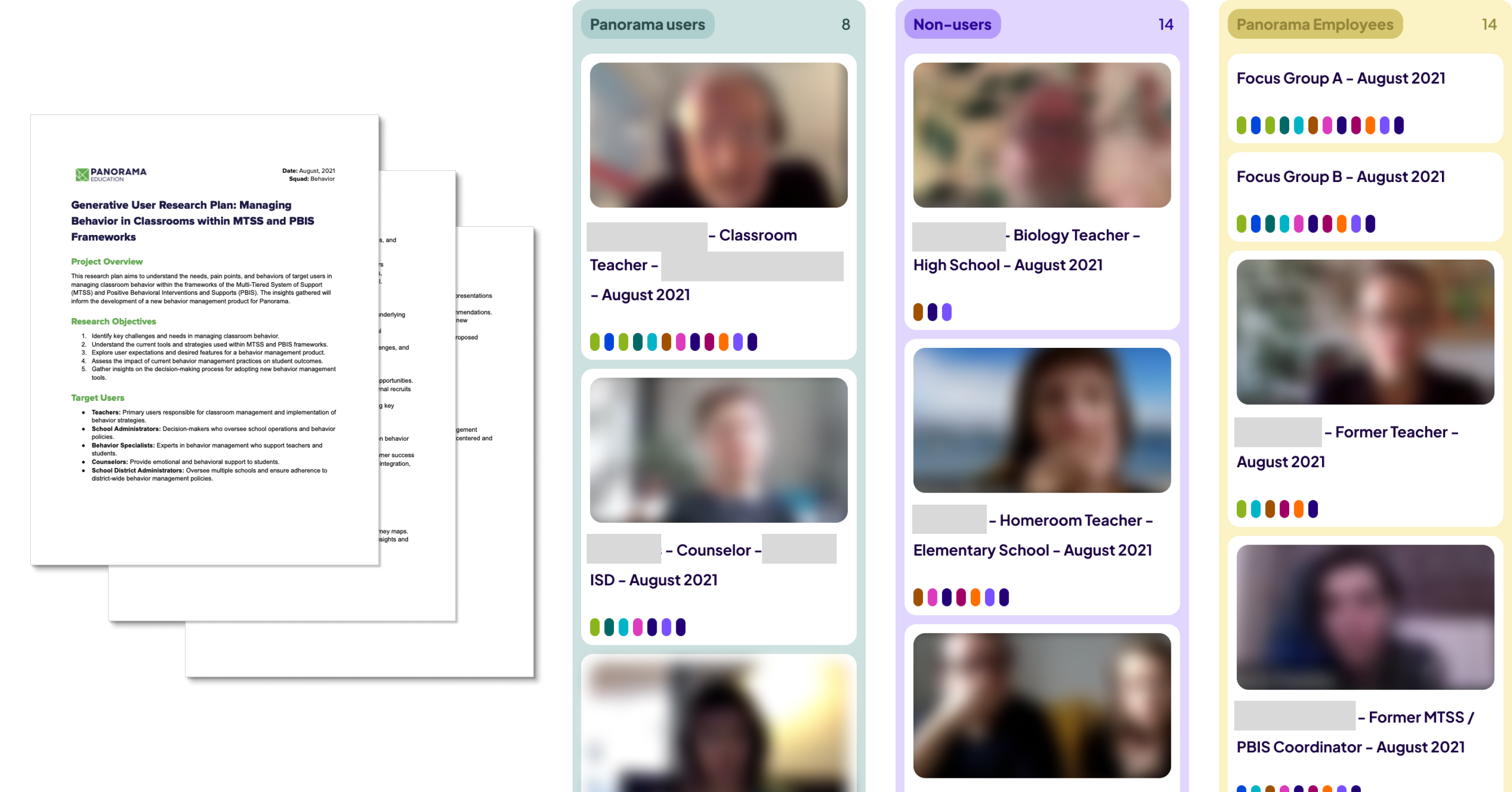
Together with the Product Manager and Academic Specialist, we began by immersing ourselves in research to define the problem space. Building on a prior competitive analysis, we conducted extensive user research with teachers, principals, district admins, and internal experts. This deep dive allowed us to thoroughly understand educators' behavior management practices and the challenges they face.
User Research
Discovery Highlights
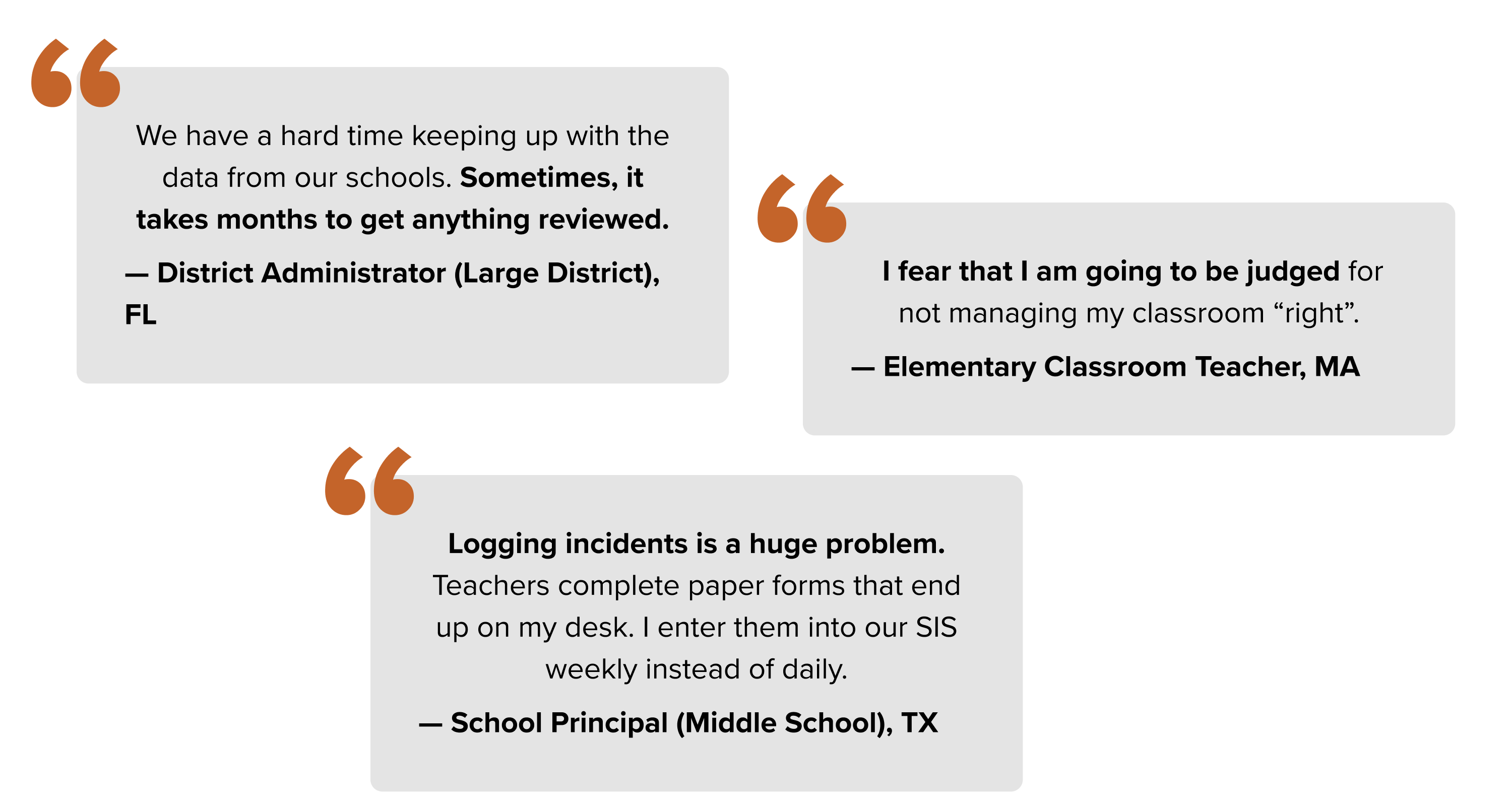
One crucial academic finding that emerged during discovery sessions underscored a strong correlation: schools with frequent major incidents often lack up-to-date Tier 2 and Tier 3 interventions. Implementing these interventions effectively can substantially decrease the occurrence of major incidents.
Additional critical learnings included the following trends:
- 40% of districts lack resources to meaningfully parse ans analyze the data.
- 95% of schools utilize at least 3 methods to record and analyze behavior data.
- 65% of teachers struggle with classroom behavior management.
Personas
After numerous workshops to define and finalize the problem space and draft a service blueprint for behavior management in schools and districts, I spearheaded the creation and dissemination of personas crucial to our new product—District Administrator, School Principal, and Teacher. We selected these personas because each plays a crucial role in successfully implementing and supporting positive behavior best practices.
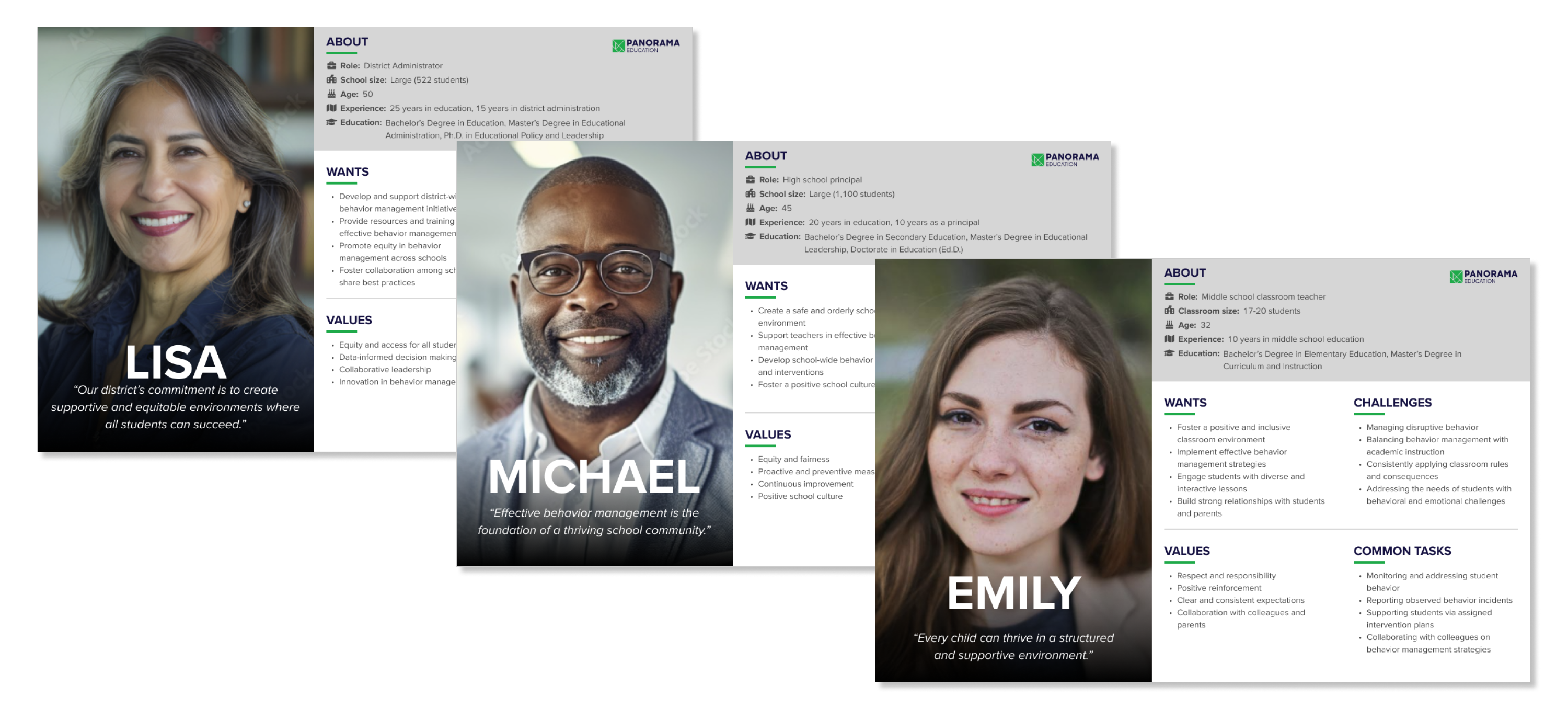
Each persona I drafted a set of specific goals that they would want to accomplish using Panorama Positive Behavior product:
District Admin Goals:
- Track district behavior trends.
- Ensure compliance with state behavior standards.
- Support school administrators and staff promptly.
School Principal Goals:
- Stay informed about behavior trends in my school.
- Get timely incident alerts.
- Provide timely and effective support to my staff and students.
Teacher Goals:
- Submit incident reports confidently.
- Stay on top of behavior management tasks.
- Receive support and resources promptly.
Planning and Strategy
For the MVP solution, the decision was made to "look within" and assess if any existing products or features could meet the personas' needs and goals. Building on existing features was crucial due to the tight 6-month deadline to launch the new product by the back-to-school season.
The "audit" revealed several key insights:
- Incident data comingfrom the SIS was unreliable and inconsistent, complicating trend and pattern reporting.
- A robust reporting system for behavior incidents includes multiple filters for detailed insights. Educators and admins utilize a sophisticated interventions management system and the Panorama Playbook, offering a wide array of strategies and guides to support students.
- There is no central hub for users to access all this information, forcing them to navigate multiple sources to understand the full picture.
Based on these insights, the strategy focused on developing a comprehensive incident logging form and three role-based dashboards. These dashboards deliver critical insights and actionable tasks for behavior management tailored to each persona.
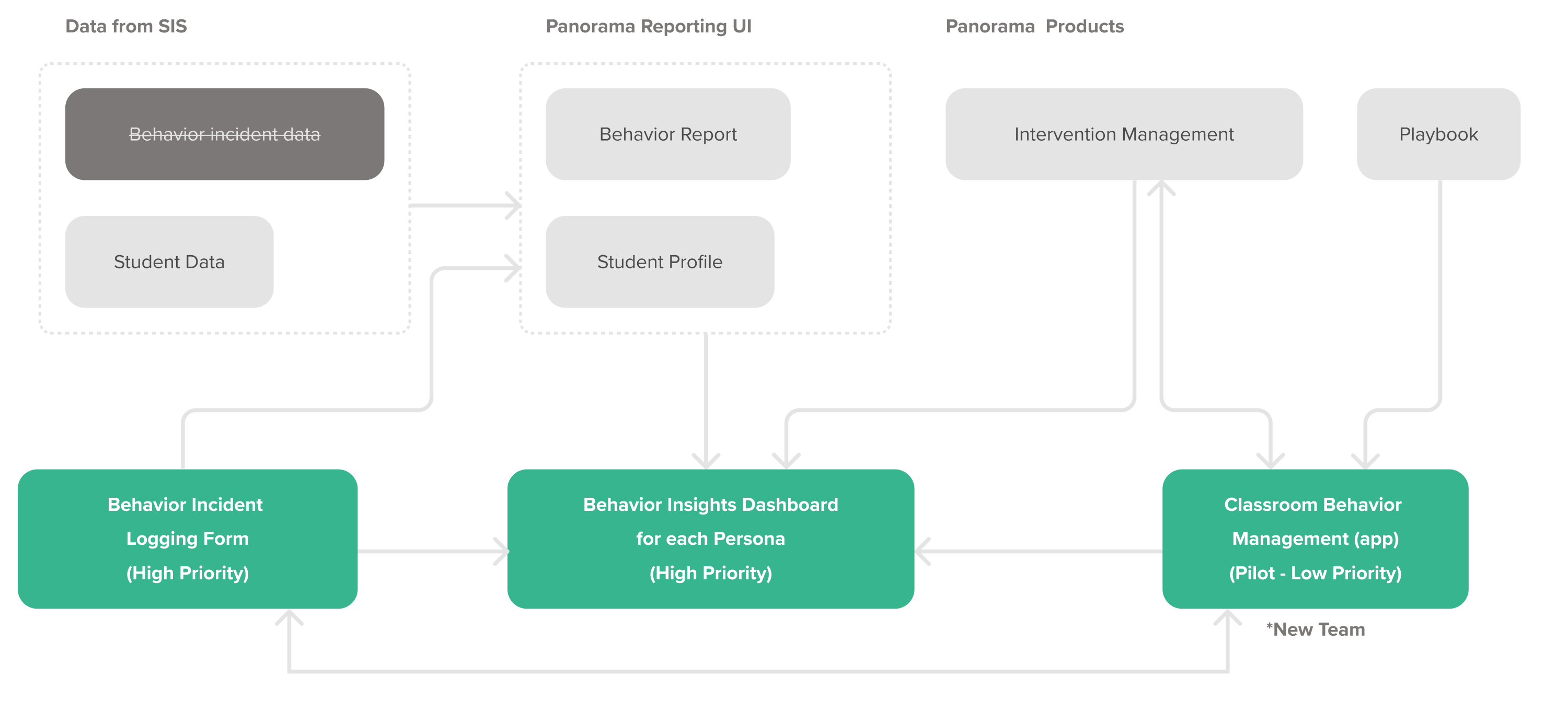
*NOTE: As part of the MVP offering, we decided to pilot a classroom management app. While I played a key role in its initial ideation and brainstorming, a dedicated team, including a mobile app designer, took over for design, iterations, validation, and development. Throughout, I served as a design lead and domain expert, providing ongoing design and product perspectives, and was deeply involved in validating and synthesizing the pilot results.
Ideation
Given the tight deadline and parallel design and development workstreams, we relied heavily on sketching and brainstorming workshops I facilitated. These sessions refined user flows and defined the product's information architecture, solidifying the main structure. I also created wireframes to guide developers in building the new and unique pages.
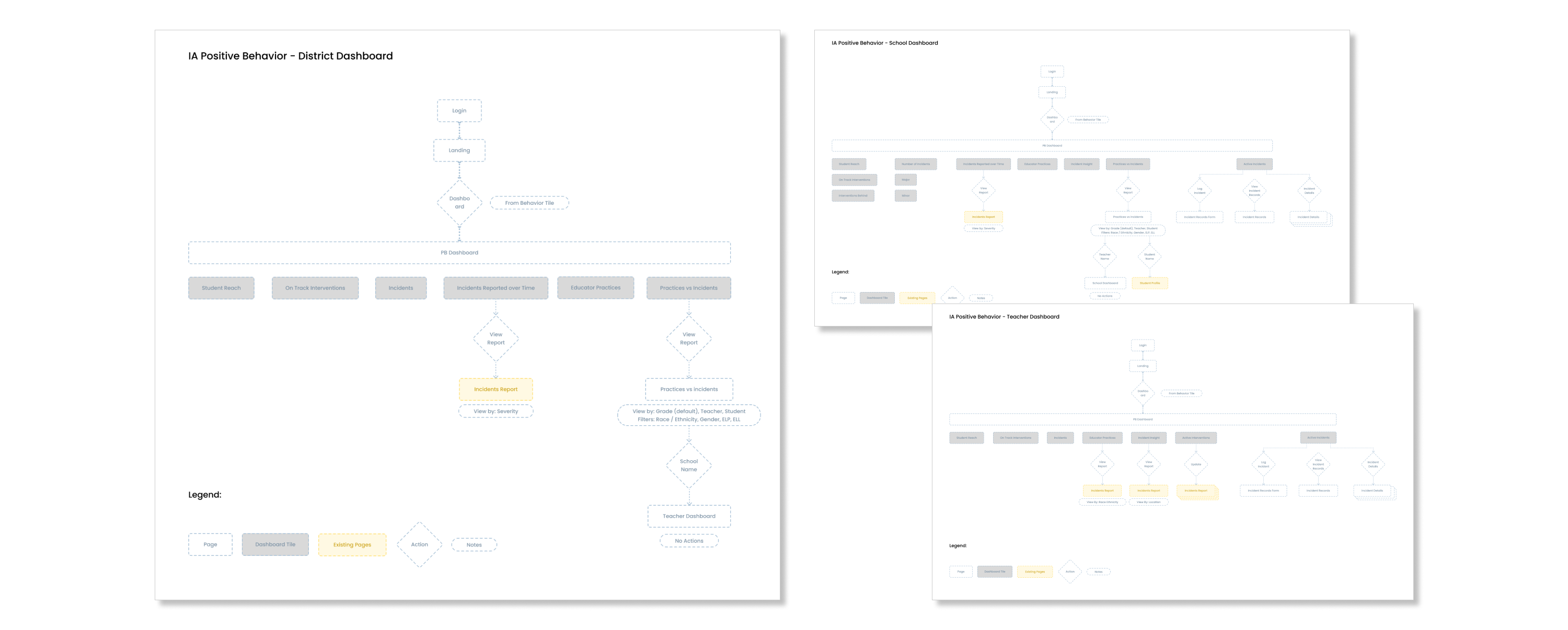
Infromation architecture

Dashbaord and Logging Form Concepts
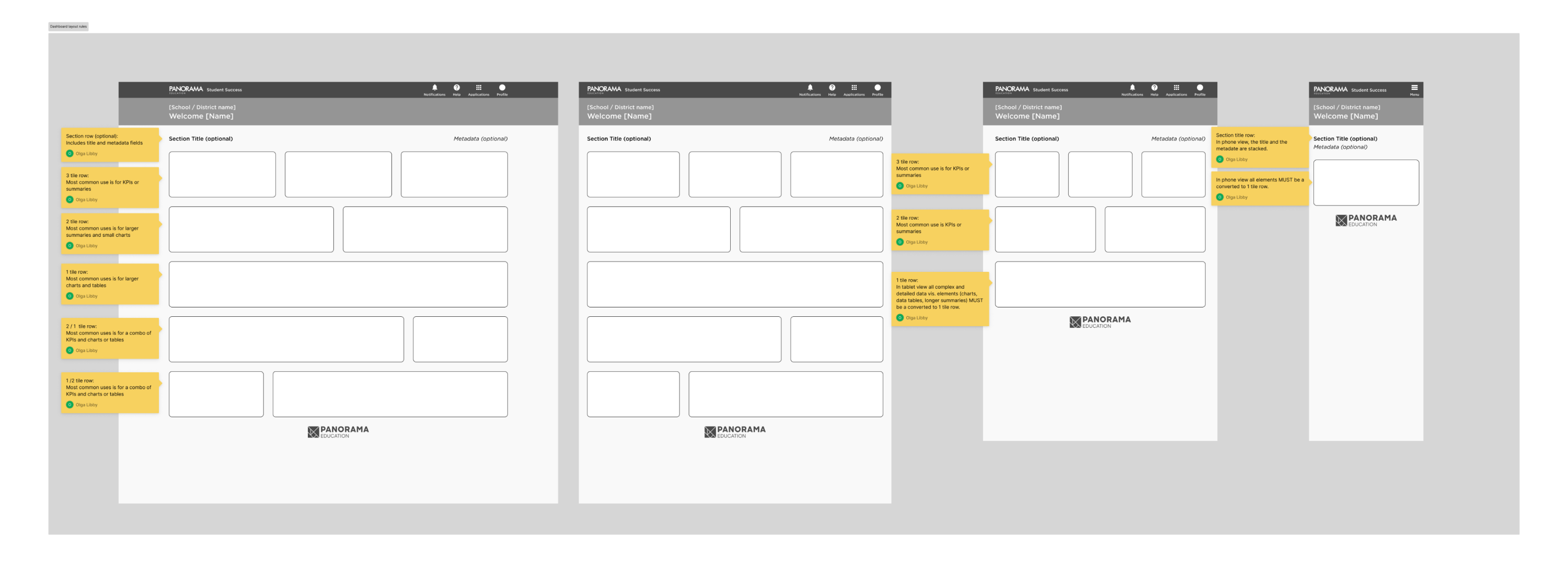
Wireframes of the dashboard page anatomy and responsiveness
MVP Solution
For the dashboards, we leveraged the academic insight showing a strong correlation between Tier 2 and Tier 3 interventions and major incidents. We crafted individual dashboards and reports for each role, emphasizing this relationship. If the numbers deviated, admins could support and troubleshoot with their staff, while teachers would know when to seek help. Additionally, we included tailored actions for each role to closely monitor interventions and incidents, provide updates, and add new information.
District Admin Experience
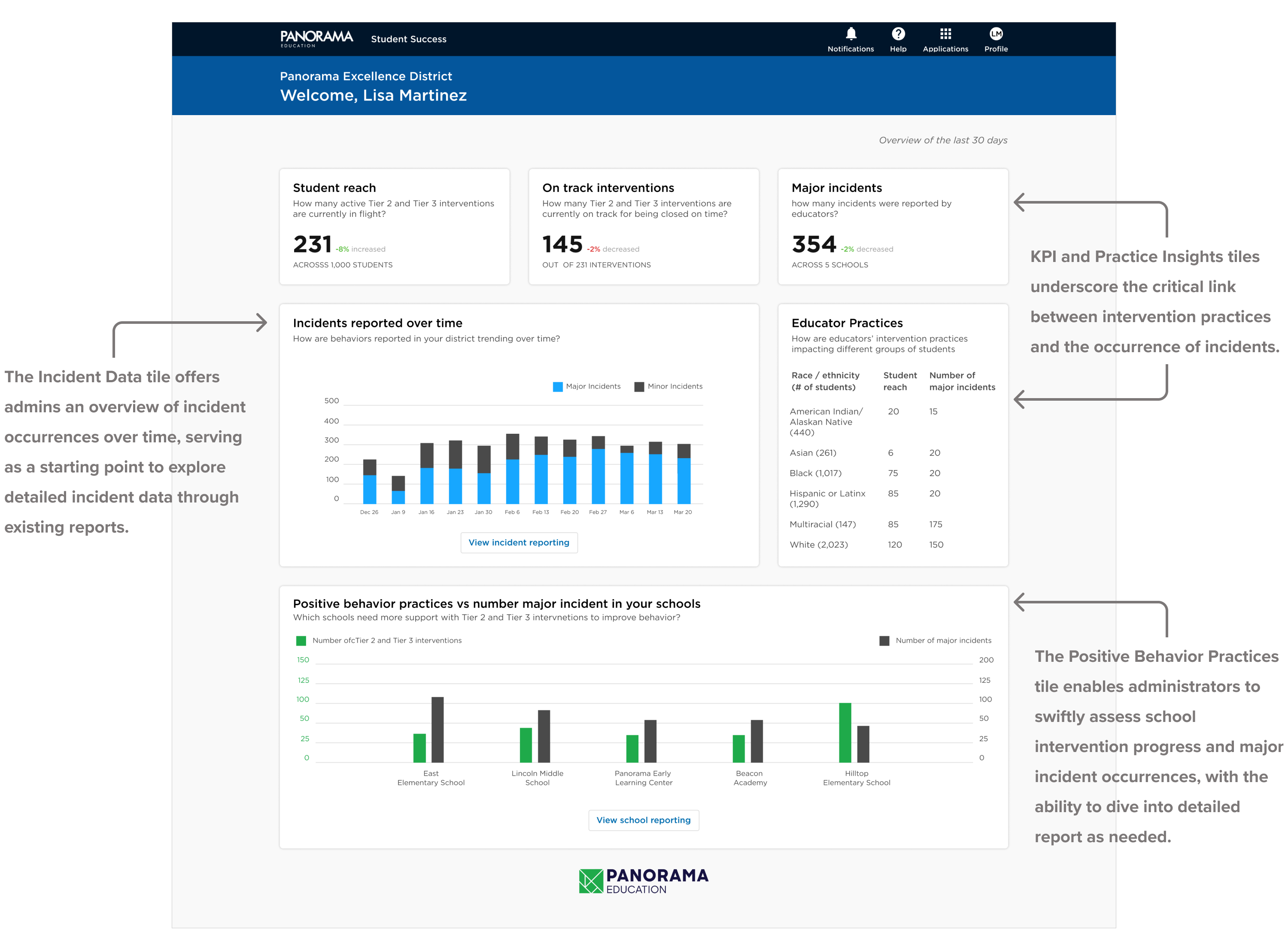
District Dashboard
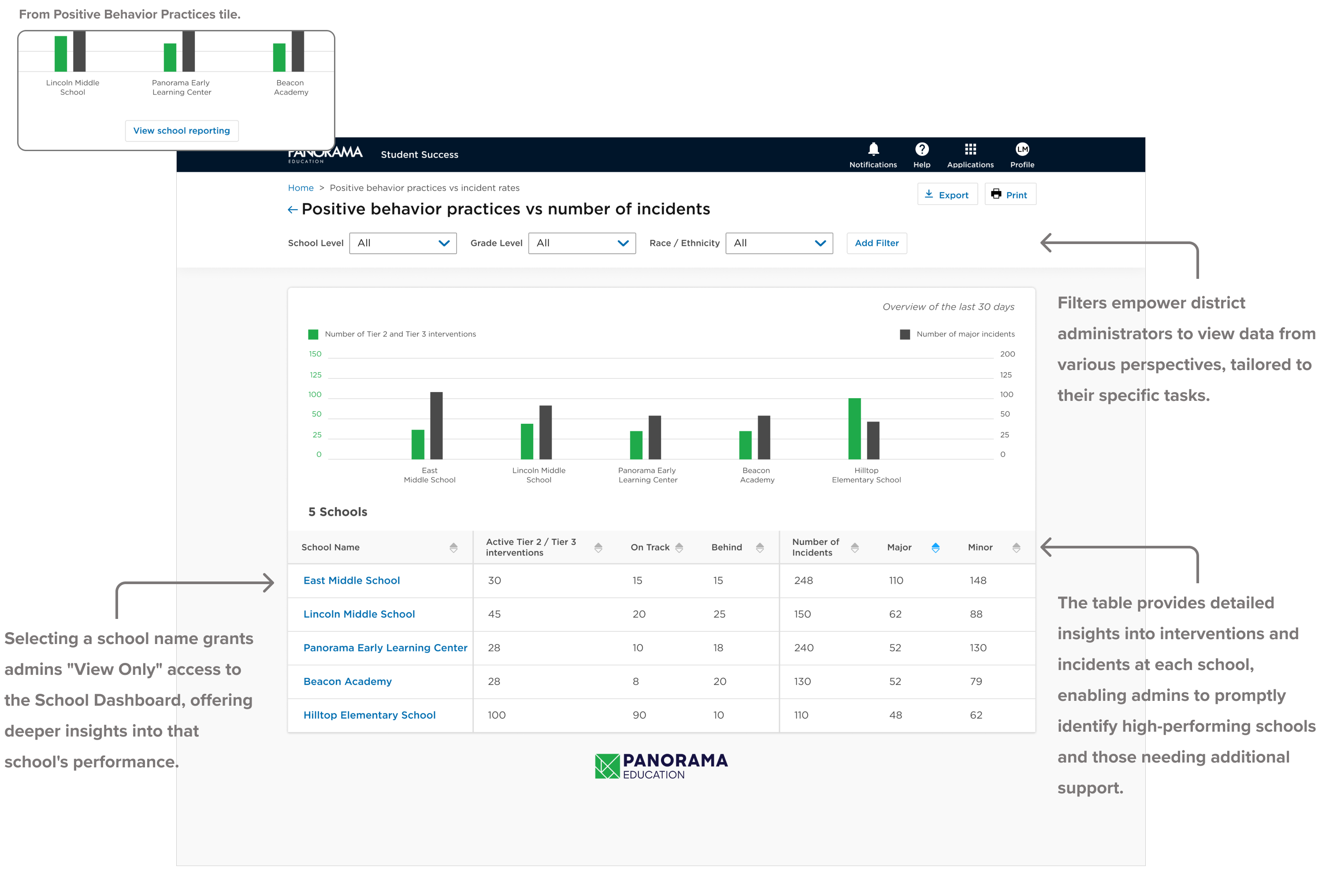
Positive Behavior Practices Report
School Principal Experience
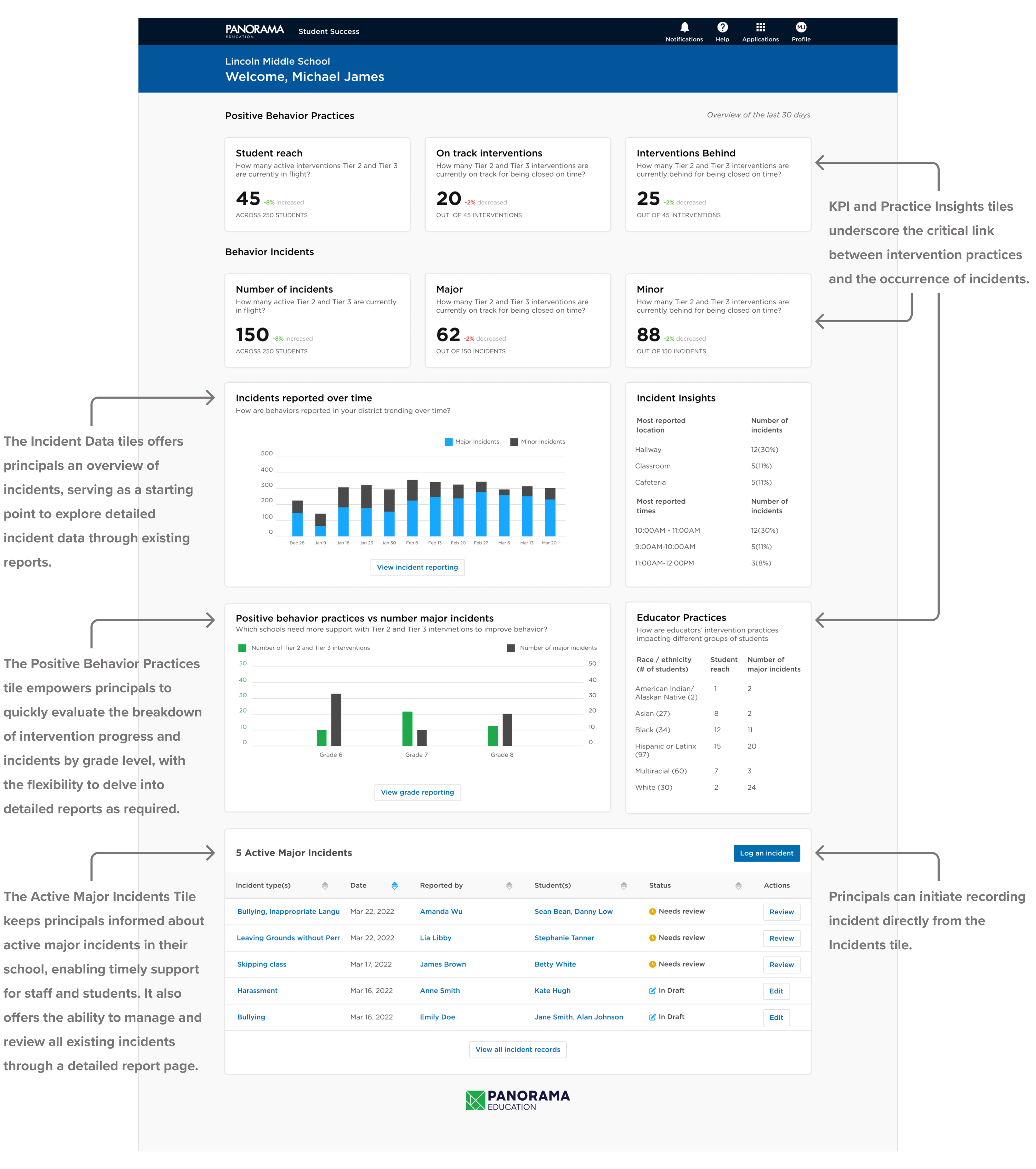
School Dashboard
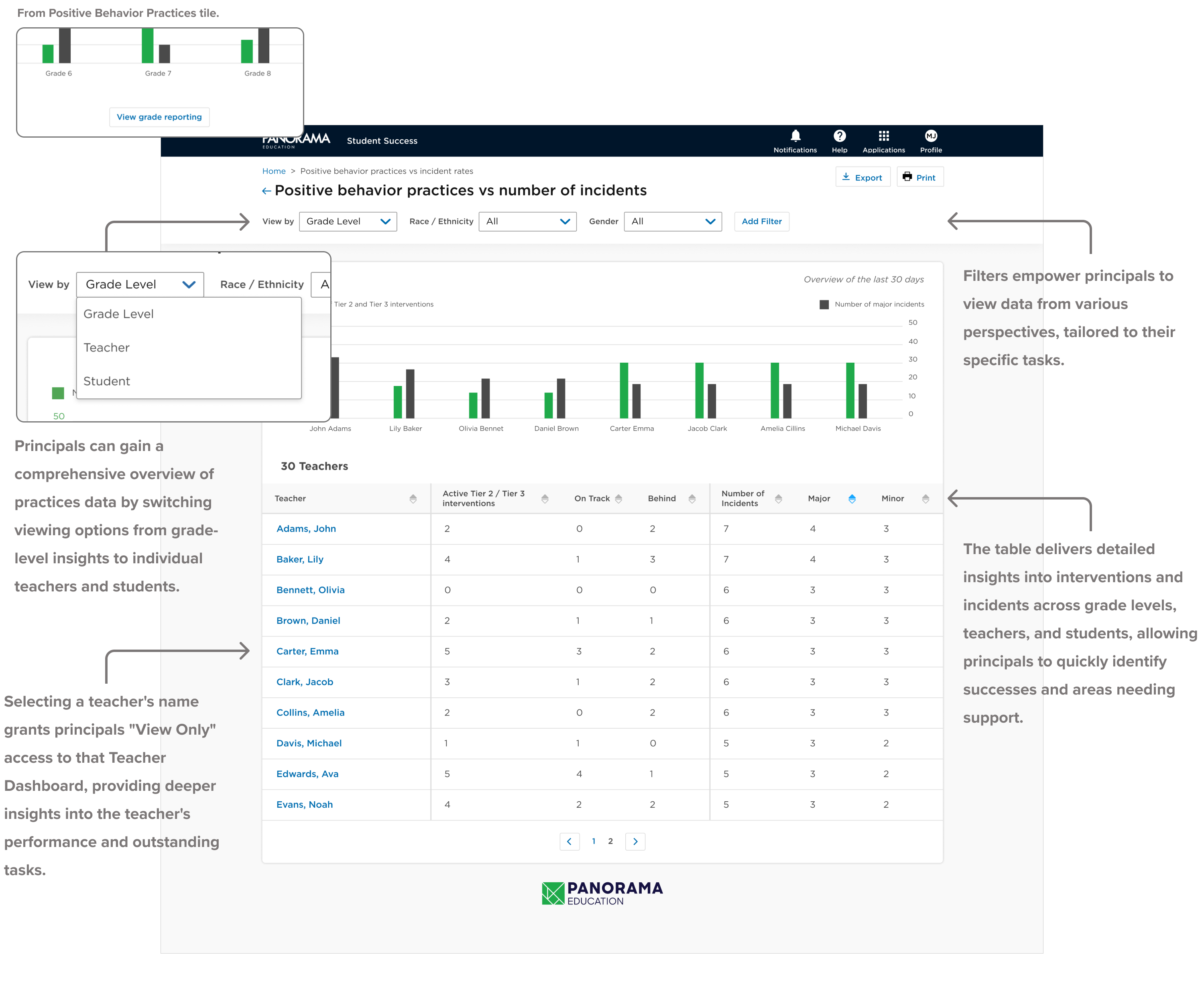
Positive Behavior Practices Report
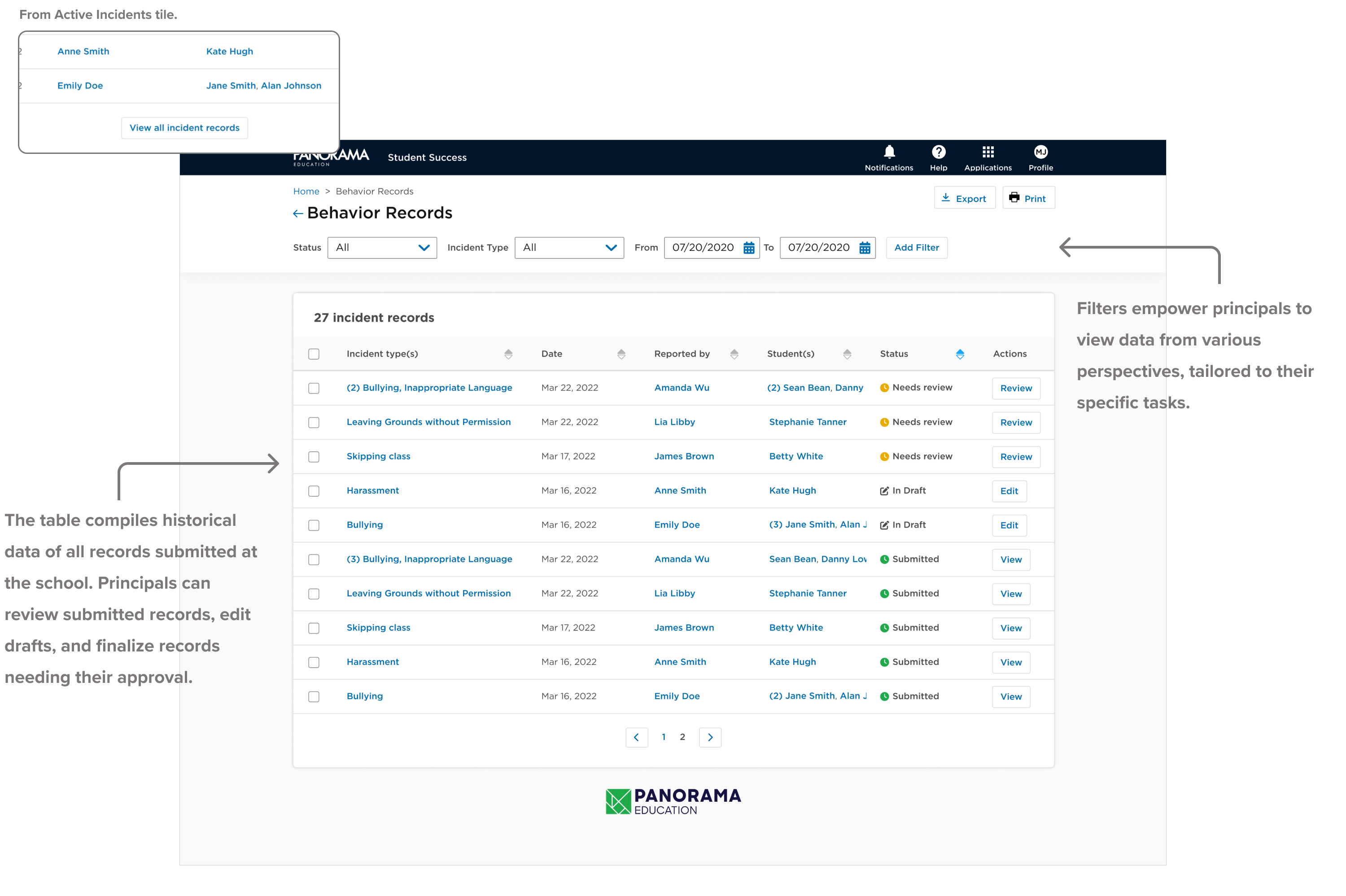
Incident Records Report
Teacher Experience
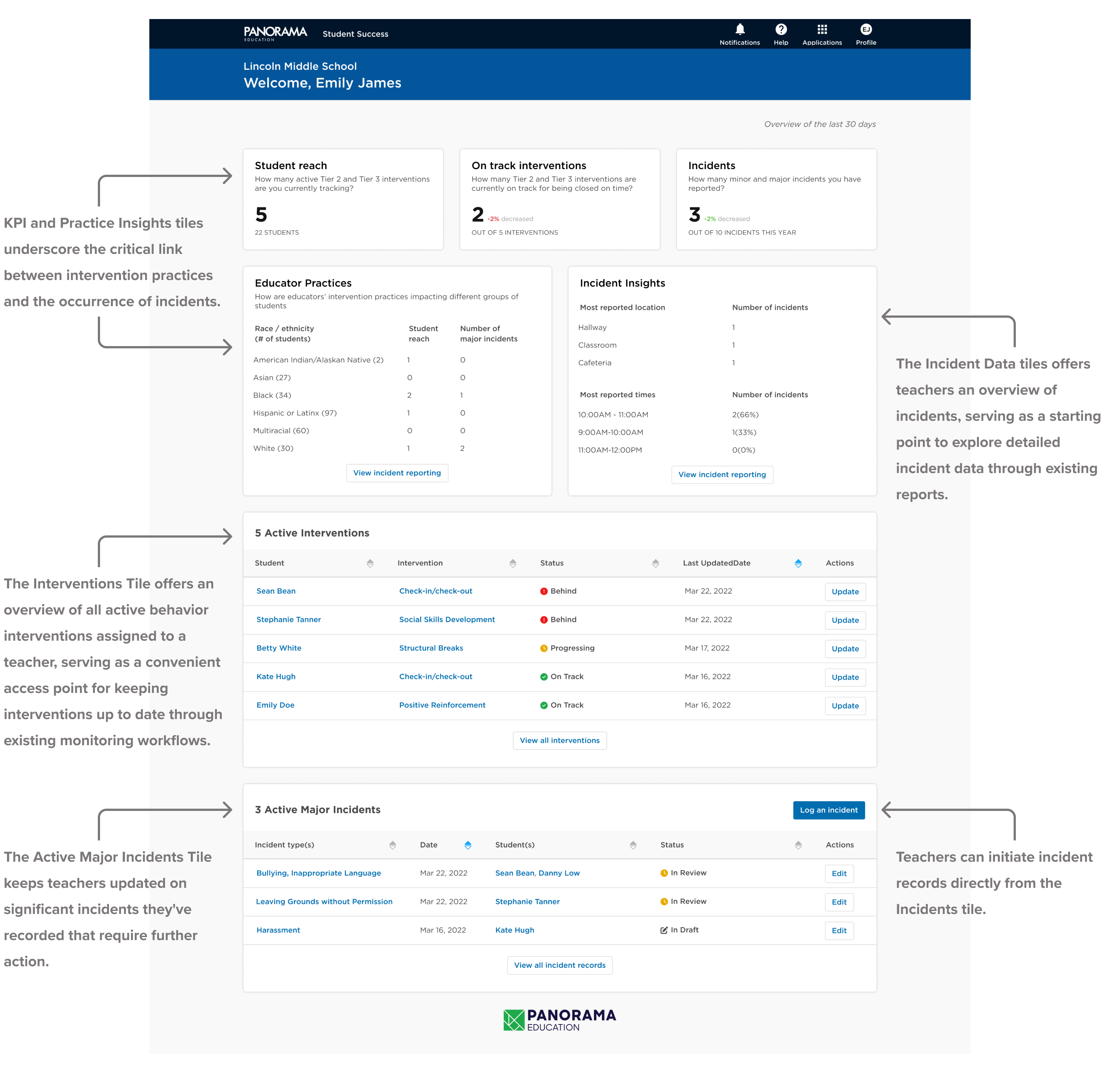
Teacher Dashboard
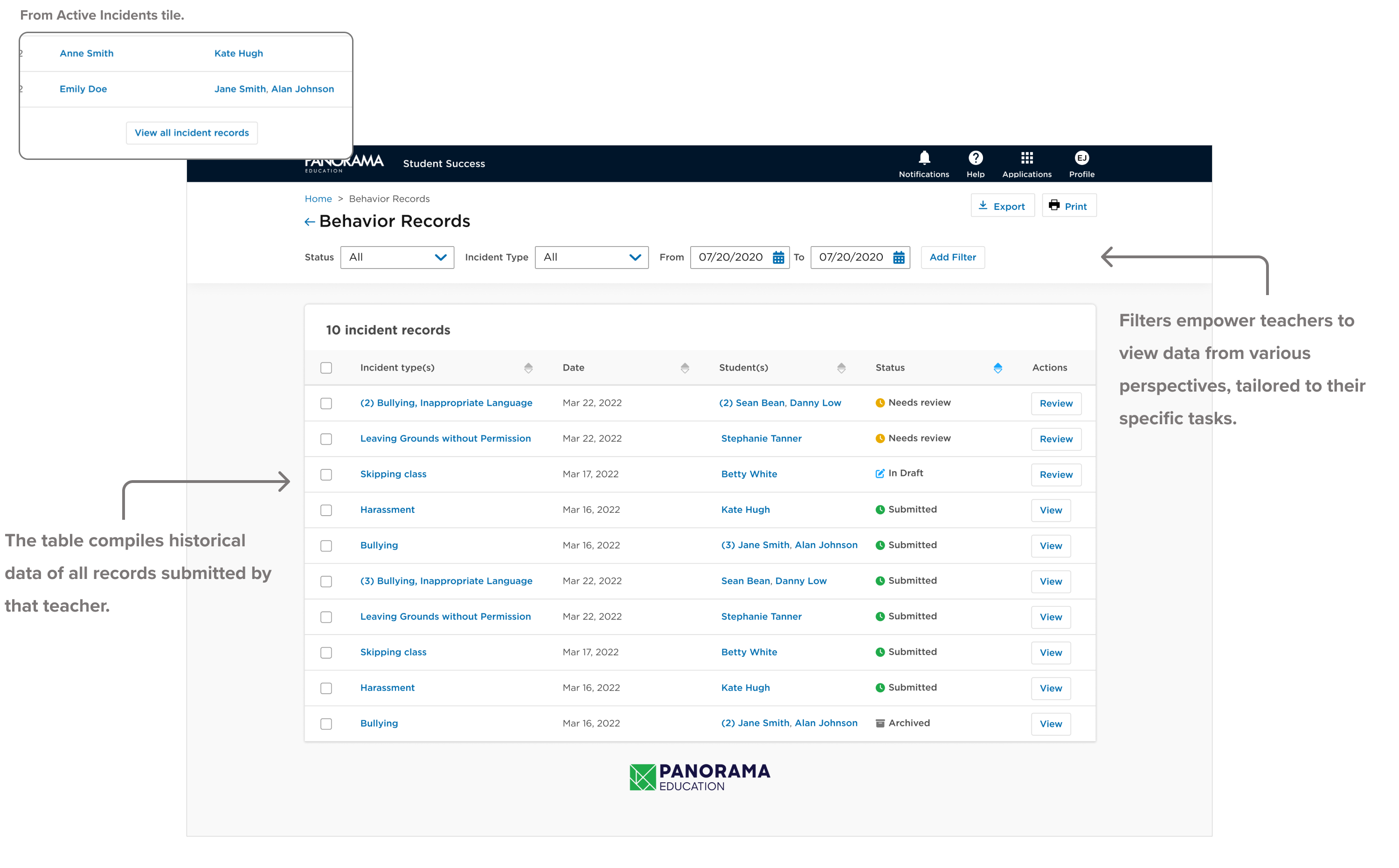
Incident Records Report
Incident Record Logging Flow
Both principals and teachers can initiate incident logging, but principals have access to additional administrative fields. These fields enable principals to finalize incident records, assign additional severity levels, and document follow-up steps and outcomes.
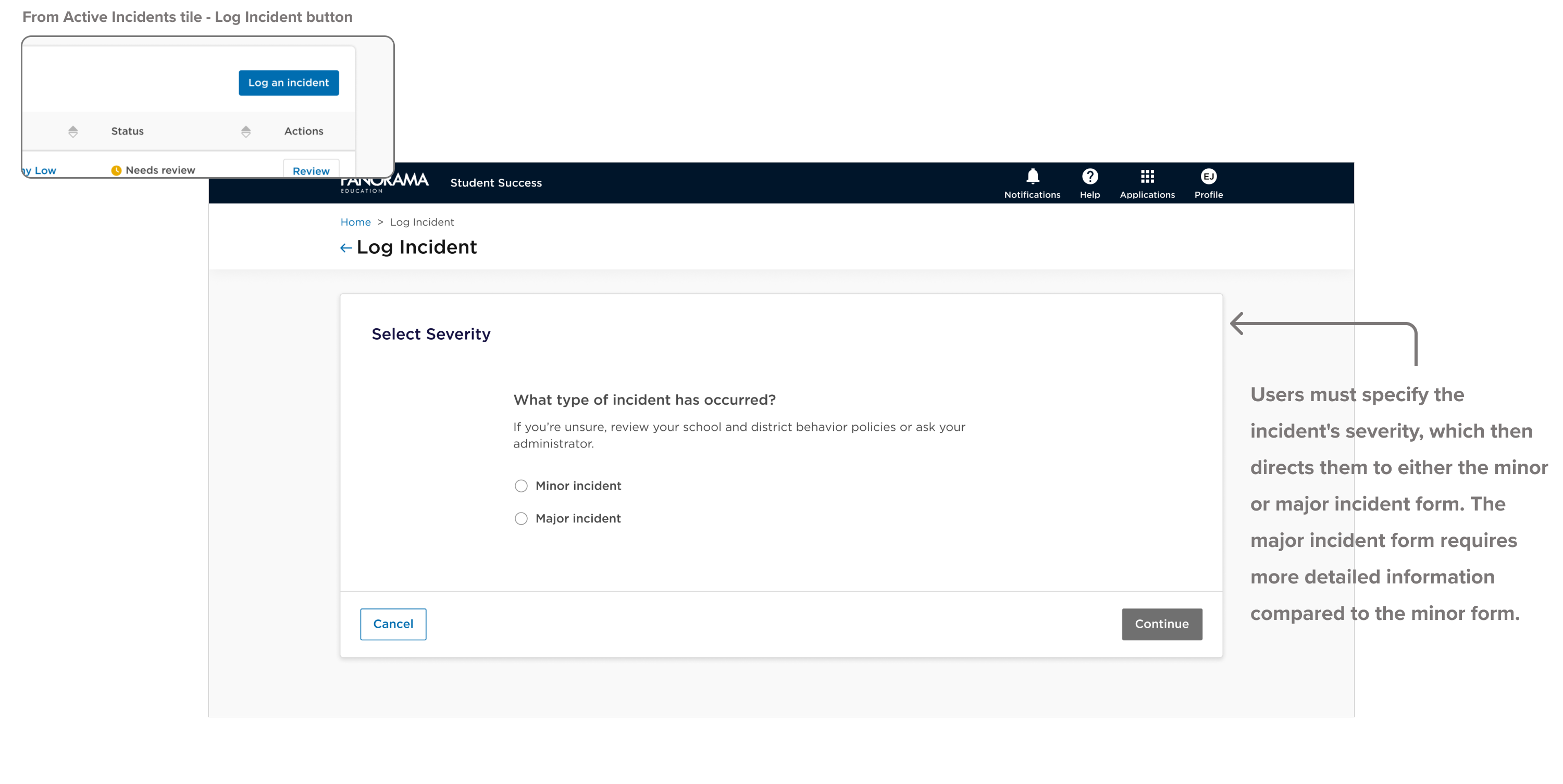
Selecting severity
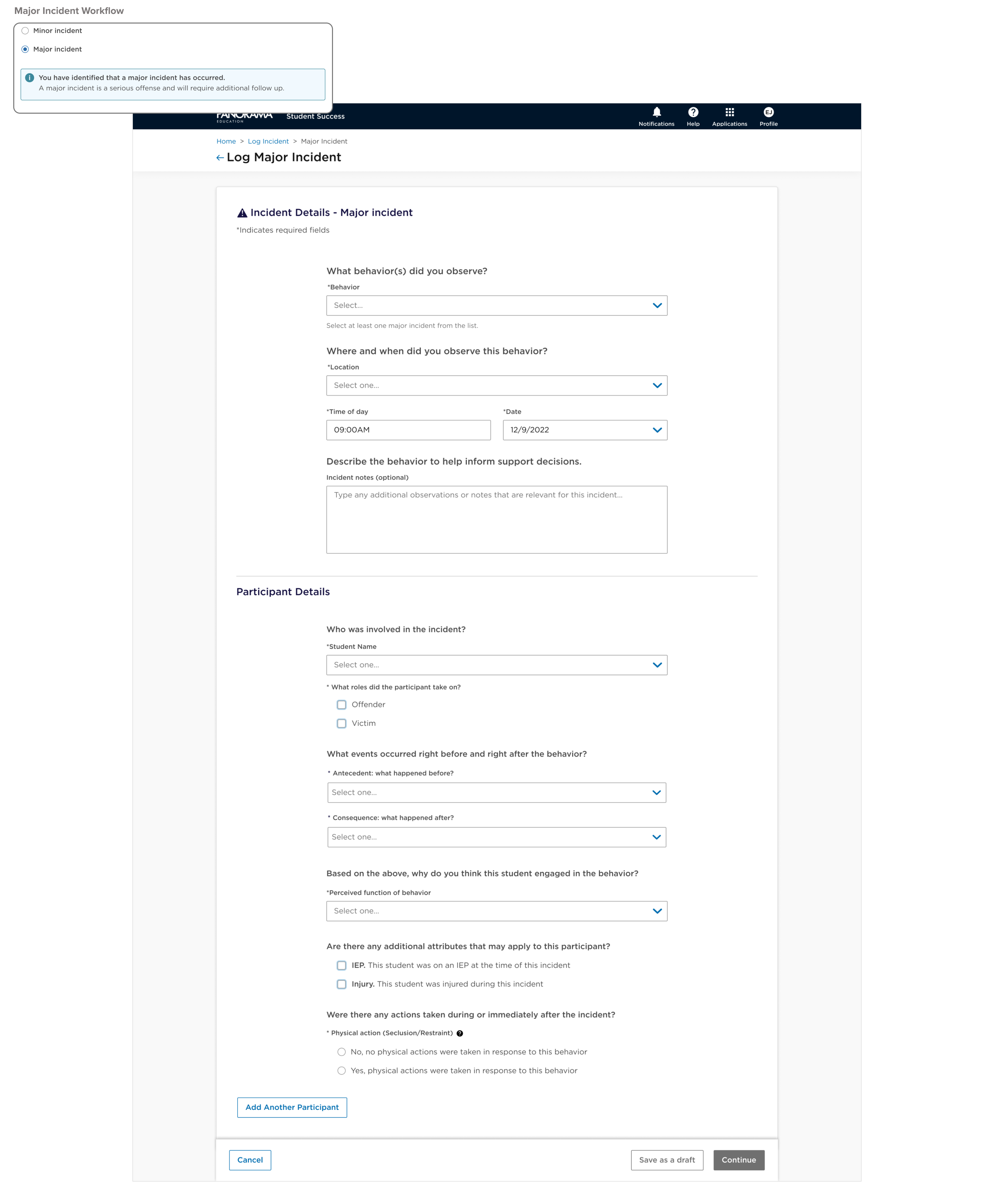
Major Incident Workflow
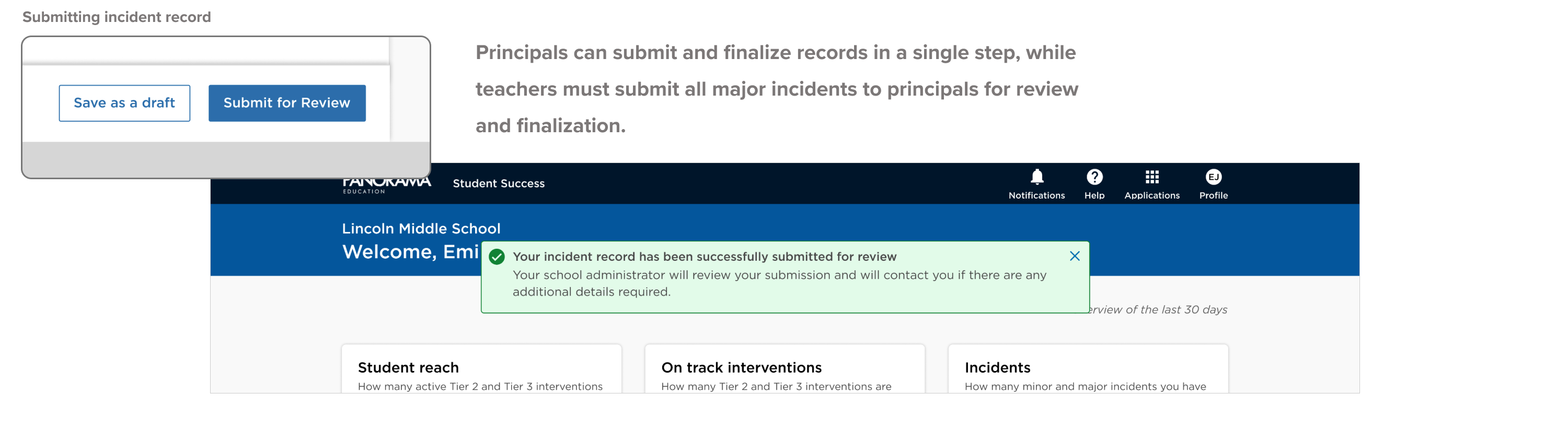
Confirmation
Validation
Testing the initial design was critical before the major release. I spearheaded the validation process by facilitating async Maze studies with teachers and principals, conducting in-person interviews with district administrators and principals, and gathering extensive feedback from internal stakeholders and the leadership team. This thorough validation revealed key opportunities to enhance the user experience, which were addressed before the initial release and in subsequent updates.
Update 1 - Notifications and Action Button
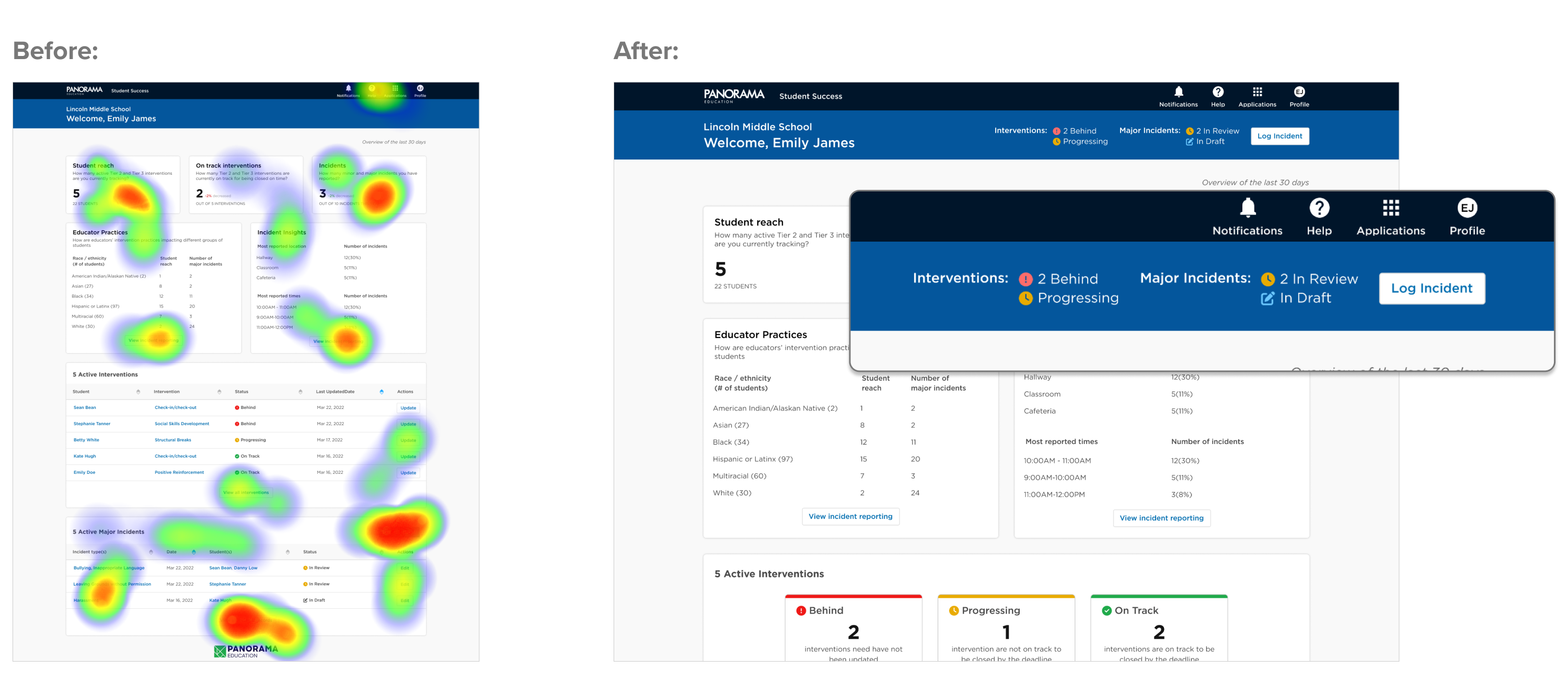
Maze Study heatmaps revealed that teachers struggled to locate the "Log Incident" button and prioritize actions on the dashboard. To address this, we implemented a notification bar in the dashboard header to spotlight outstanding actions and added an easily accessible "Log Incident" button.
Update 2 - Notifications and Action Button
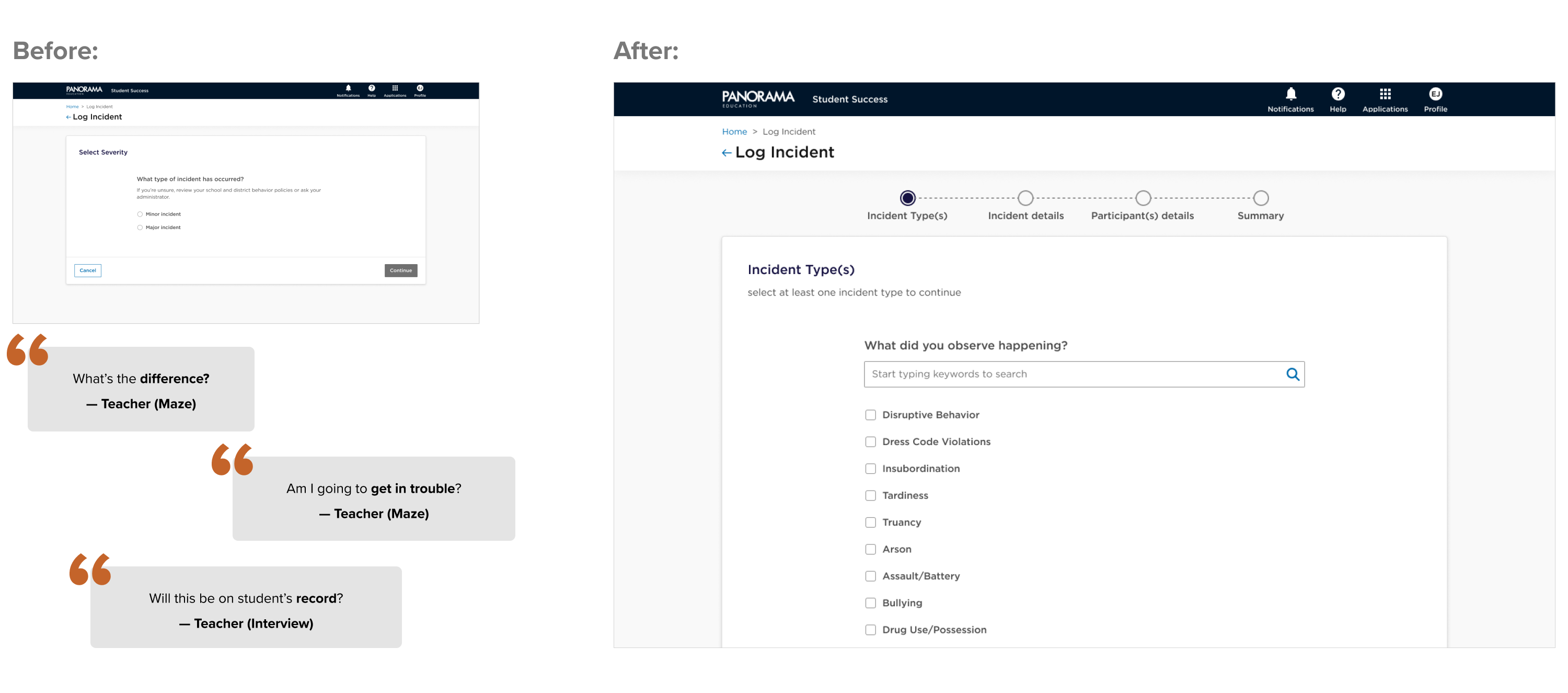
Differentiating between major and minor incidents was essential for district administrators and principals, but teachers often struggled with the severity selection page. Many teachers were unclear on the distinctions or lacked the knowledge to accurately assess incident severity. Others were apprehensive about the potential consequences for themselves and the students involved. The update streamlined the process by replacing severity selection with a simple choice of observed behaviors from a list. The system now automatically maped the severity and directs users to the appropriate workflow behind the scenes.
Update 3 - Incident logging form structure
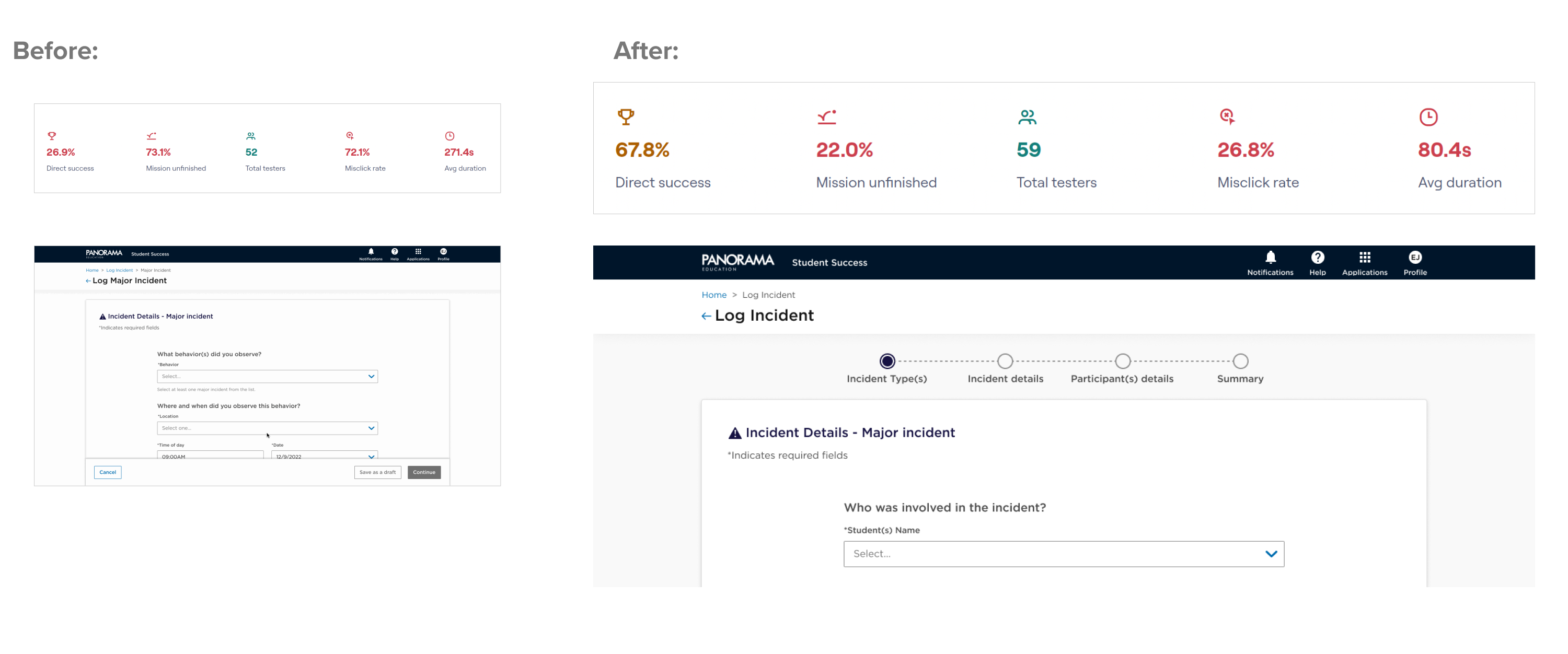
Maze study results highlighted a significant drop-off rate during the incident logging flow. Follow-up interviews revealed that participants struggled with navigating the numerous form fields and were overwhelmed by the form's length. Additionally, for major incidents, users noted that the process often required multiple stages: initially capturing immediate details such as location and time, followed by more detailed information like motivation and student-specific data.
To address these issues, the updated solution redesigned the form into four logical steps and introduced a progress bar at the top. This new approach guides users through the process, making it more manageable and reducing drop-off rates.
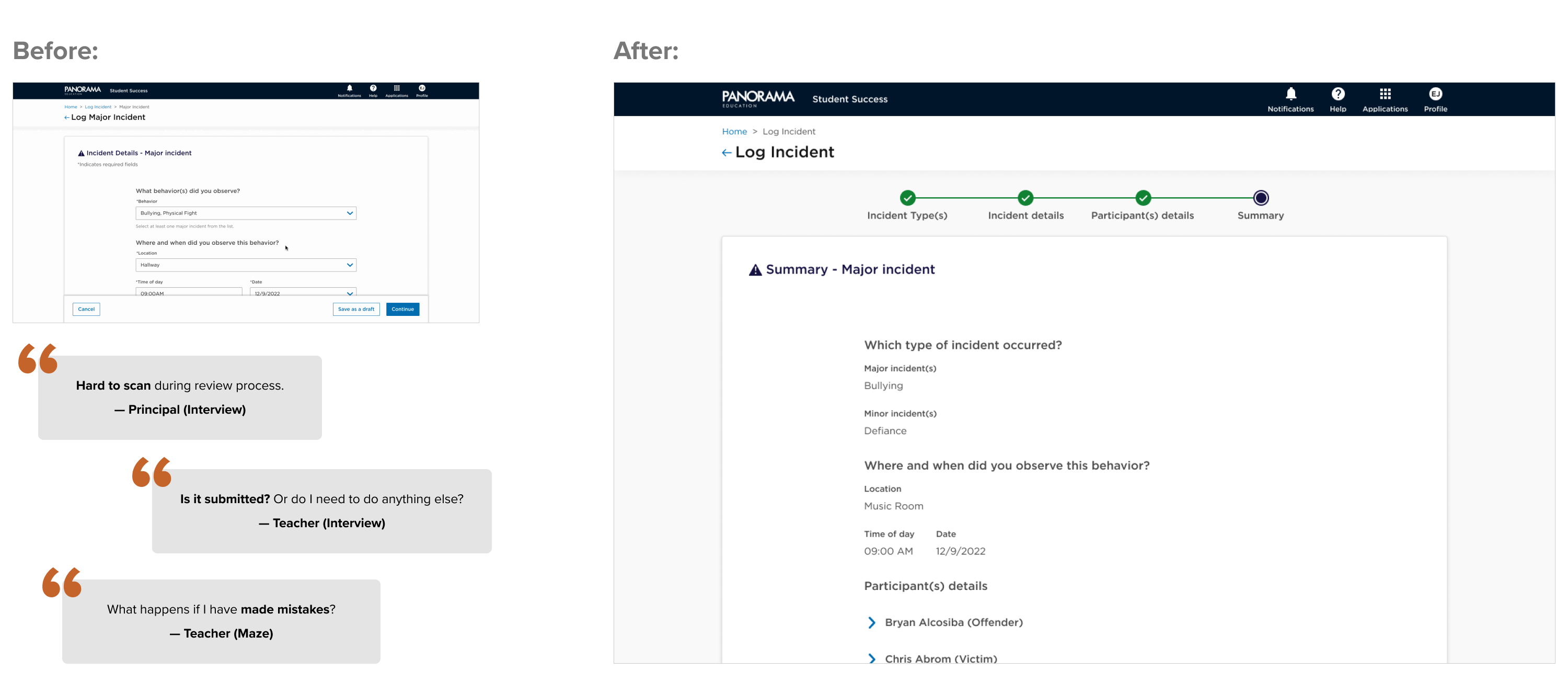
Update 4 - Incident Summary
Interviews and Maze comments revealed that users were dissatisfied with the incident log submission process, feeling it was abrupt and disappointing after completing a lengthy form. Participants expressed a need for a verification step to ensure that all information was accurately captured. Additionally, principals wanted a more streamlined way to review data rather than having to navigate through input boxes.
To address these concerns, we introduced a summary page where users can easily review their data before finalizing the submission. For principals, this solution provides a straightforward method to review submitted forms, decide if further actions are needed, or finalize the submission.
Update 5 - Data Visuals for Outstanding Tasks and Reports
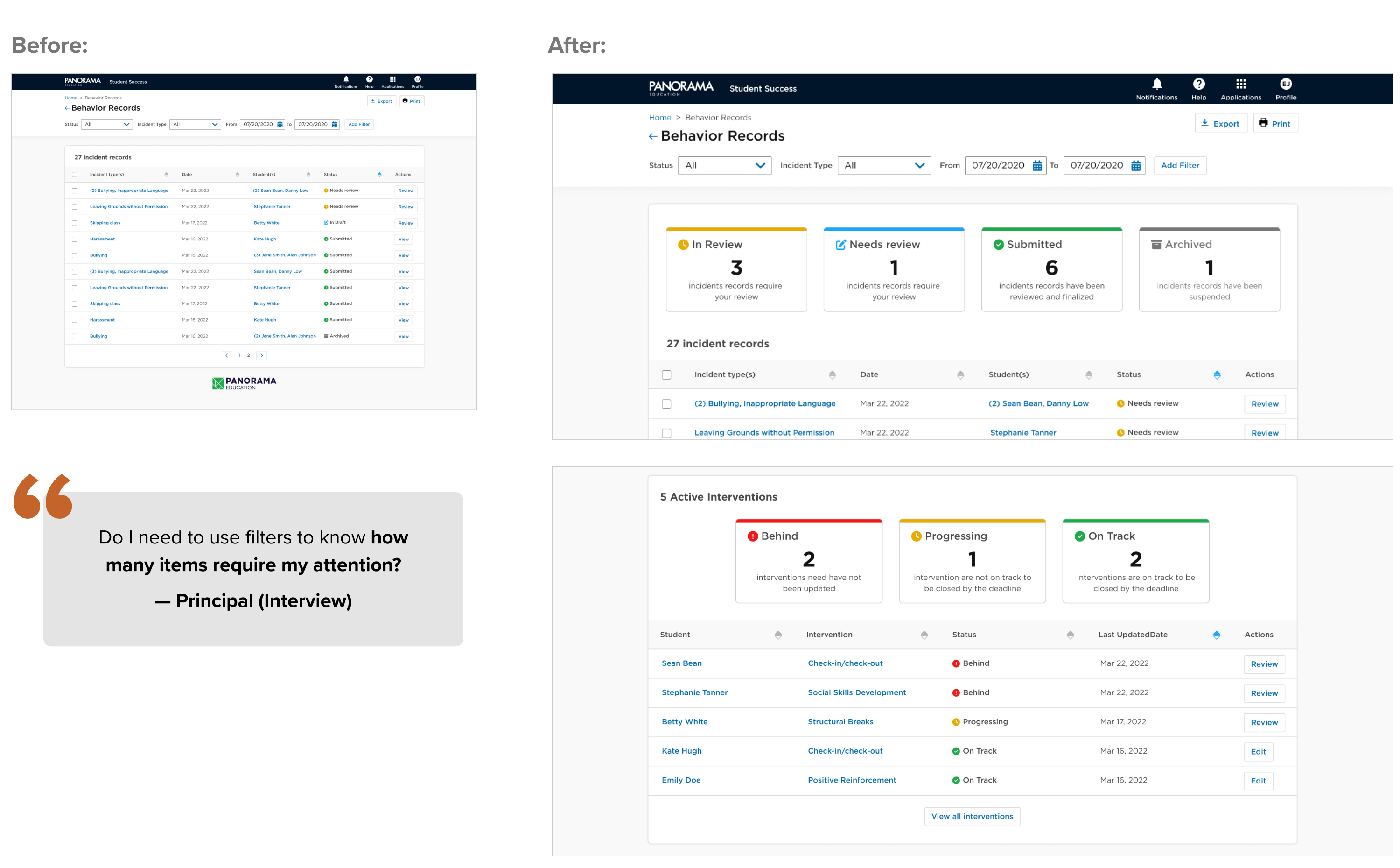
The interviews offered valuable insights into users' experiences with the MVP. While most found the content highly useful, they described it as dense and challenging to scan.
To enhance the experience and introduce an element of joy, we incorporated summary data visuals into the Interventions and Incident tiles and report pages. The primary objective was to provide users with a quick overview of their tasks and progress, making it easier to complete outstanding items. Additionally, the summary data visualizations were integrated into the design system and extended to other Panorama products, adding consistency and value across our offerings.
Outcomes and Lessons
Results
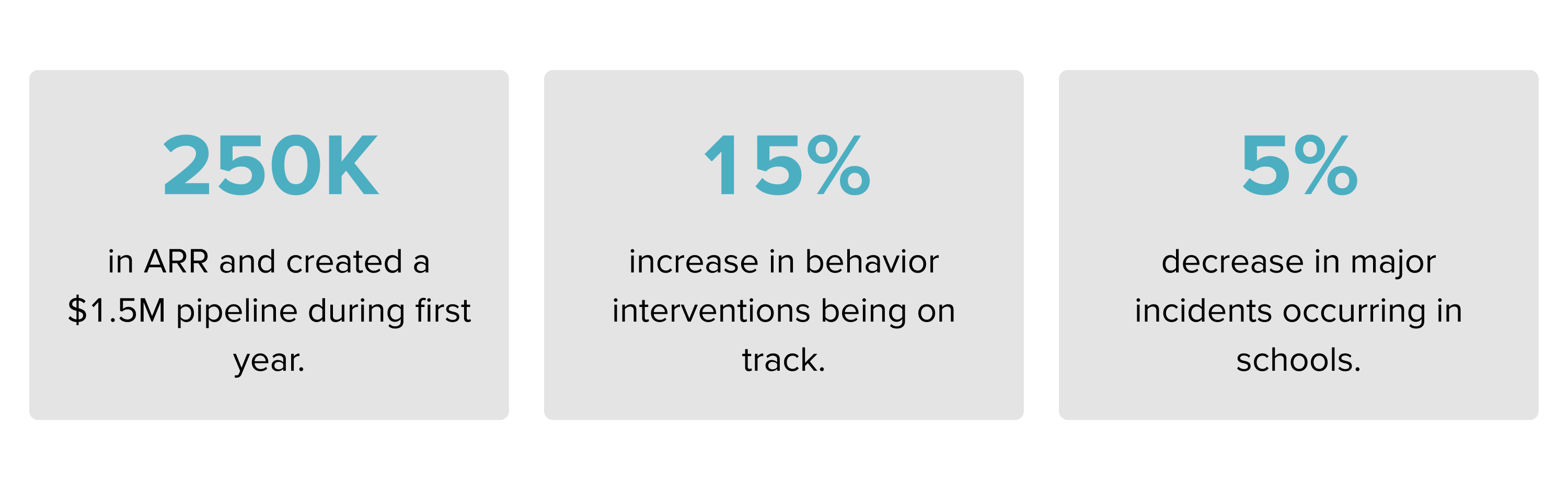
Although the change in management posed a significant challenge, we observed a notable and positive shift among schools that embraced the new product. These schools demonstrated a meaningful commitment to diligently tracking interventions and accurately submitting completed incident forms, reflecting a significant improvement in their adherence to the new processes.
Beyond MVP
- During our initial discovery phase and follow-up interviews, we uncovered that incident logging is a complex, multi-faceted process that varies significantly from district to district and even between schools. Following the release of our MVP, we quickly received requests from multiple clients for custom fields. This feedback prompted our team to embark on an in-depth discovery and ideation cycle, which I led. The outcome was a highly flexible and customizable system, enabling clients to create tailored incident logging forms that precisely meet their unique needs.
- Although the mobile app did not pass the initial pilot, the insights gained and the prototype developed were crucial. Leading the design and discovery for this project, I leveraged these learnings to lay the groundwork for a custom behavior intervention workflow—Check-in/Check-Out. This new system incorporates valuable feedback and addresses the challenges identified, resulting in a refined and effective solution that enhances behavior intervention processes. This experience highlights how initial challenges can drive innovation and lead to meaningful improvements.
- The design and development of Positive Behavior Product significantly boosted the growth of the Panorama design system, Tangrams. This led to a major overhaul of navigation and analytics dashboards, enhancing user experience and functionality. By integrating innovative behavior design principles, we streamlined interactions and set a new standard for effective data analysis and user engagement.
What I Learned
- Research and strategy are fundamental to successful team collaboration and product release. Thorough research provides a deep understanding of user needs, market trends, and potential challenges, while a well-defined strategy ensures that all team members are aligned and working towards common goals. This combination fosters a collaborative environment where informed decisions drive innovation, ultimately leading to the release of high-quality, impactful products.
- Launching with tangible value sooner is more advantageous than waiting for the perfect product later. Early releases allow teams to gather real-world feedback, iterate quickly, and address user needs more effectively. This approach fosters continuous improvement, builds user trust, and keeps the product relevant in a fast-paced market. Delivering incremental value demonstrates responsiveness and commitment, ultimately leading to a more refined and successful product over time.
- Despite making tradeoffs to cut scope and expedite the launch, our dedication to user testing ensured an optimal MVP experience for our clients. These strategic decisions allowed us to focus on core functionalities that mattered most, ensuring the initial release was valuable and user-centric. By continuously testing and refining based on user feedback, we prioritized impactful features, maintaining high quality and satisfaction while meeting tight deadlines. This approach facilitated a successful launch and laid a solid foundation for future enhancements.