
This case study walks through how I addressed fragmented user feedback scattered across five disconnected tools by designing a phased solution: first, a Claude skill that analyzed and tagged NPS and SuperQ responses against a shared company taxonomy, and second, a Next.js and ShadCN dashboard that turned those validated insights into a shareable, filterable, and self-serve product for stakeholders.
Role:
Lead
Timeline:
1 month
Outcomes:
- Phase 1: The Claude Skill Experiment
- Phase 2: From Spreadsheet to Shareable Dashboard
- Phase 3: Design and UX Explorations
02. The Evaluation Phase
The Search for a "Single Pane of Glass"
I led the initiative to find a centralized repository that would allow for easy navigation, pattern recognition, and seamless distribution of insights. I evaluated two primary candidates: Dovetail and HubSpot.
Candidate A: Dovetail (The "Insight" Tool)
- Pros: Excellent for qualitative data analysis and tagging.
- Cons:
- Accessibility: Non-product stakeholders (Marketing, Sales) found the UI unintuitive and difficult to navigate.
- Scalability: Our subscription model limited the number of contributors, creating a bottleneck where only a few could upload data.
Candidate B: HubSpot (The "CRM" Tool)
- Pros: Already integrated into our sales and marketing workflows.
- Cons:
- UX/UI Friction: The interface was not designed for qualitative synthesis.
- Adoption: The friction in the UI prevented full team adoption, leading to inconsistent data entry.
The Verdict:
Neither existing tool could serve as the "end-all" repository without sacrificing user adoption or functionality. I decided to pivot to a phased approach.
03. The Solution: Phase 1 - The Claude Skill Experiment (1 week)
Phase 1 was designed as a fast-turnaround experiment to answer a single question: Can AI reliably analyze and tag our survey feedback using our own taxonomy? The goal was not to build the final system, but to validate whether further investment was warranted.
The Objective: Build a Claude skill that would ingest raw survey CSVs and produce a single, analyzed report spreadsheet covering NPS, SuperQ, and CSAT open-ended responses, complete with sentiment tagging based on our established taxonomy.
The Taxonomy: Before any automation could work, the Product and Design teams had collaborated with stakeholders across the company to build a shared taxonomy, a controlled vocabulary for categorizing feedback. This taxonomy, along with detailed descriptions of how to identify and tag each response, became the backbone of the Claude skill. This was critical. It meant the AI was not inventing categories, it was applying our agreed-upon framework.
The Workflow (Manual but Functional): The process was intentionally scrappy to keep the experiment lightweight:
- Weekly Download: On a weekly cadence, I manually downloaded CSVs of NPS, SuperQ, and CSAT responses from HubSpot and Typeform.
- Naming Convention: To keep things organized established a file naming convention that included the date range of the responses (for example,
NPS_2024-01-01_to_2024-01-07.csv). This ensured that specific date ranges could be easily referenced in the future, whether for audits, trend analysis, stakeholder requests or future AI-experiements. - Folder Drop: I placed the files into a dedicated "To Process" folder on my desktop.
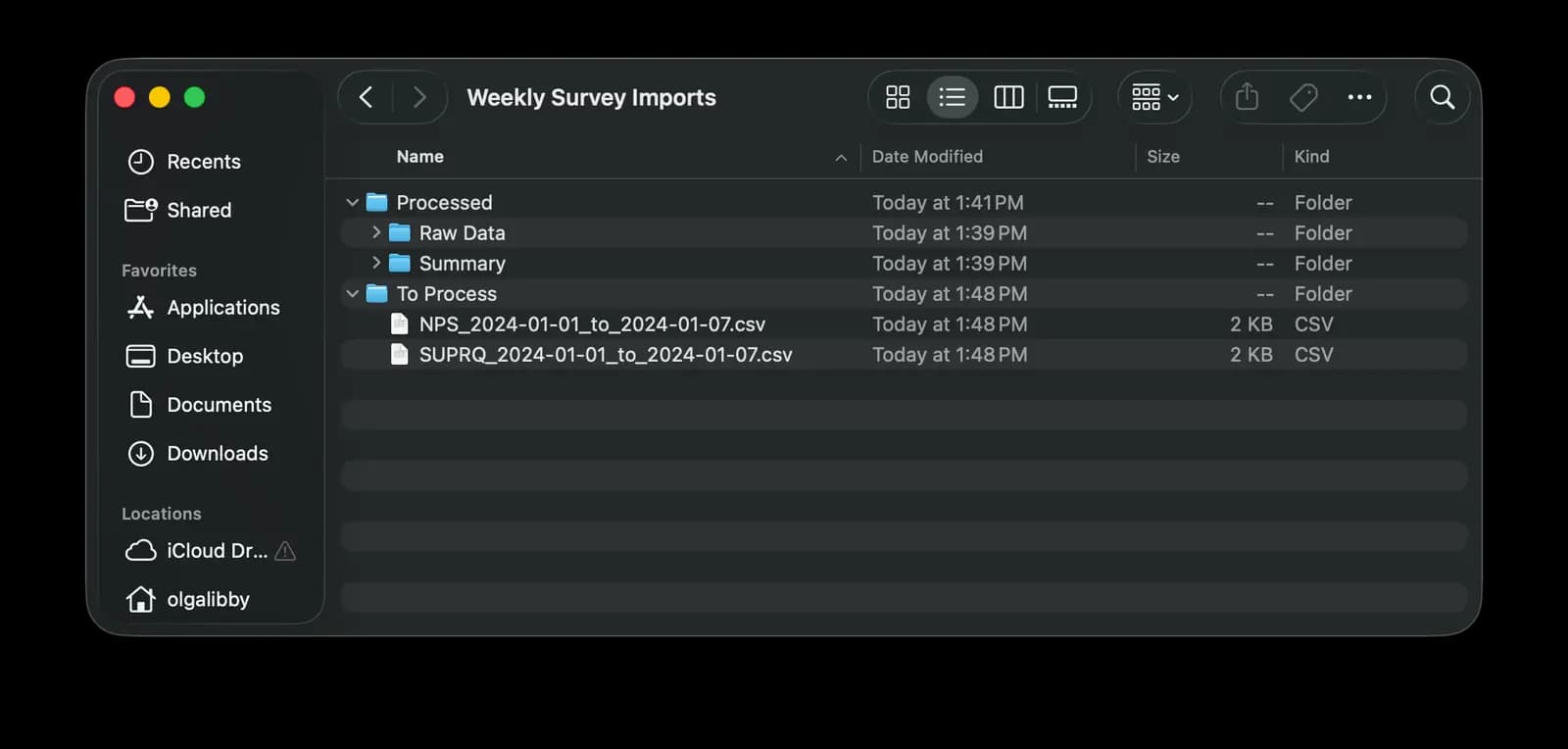
- Skill Execution: I initiated the custom Claude skill, which was instructed to:
- Calculate and report NPS according to our defined formula.
- Calculate and report SuperQ scores.
- Evaluate the sentiment of every open-ended response.
- Tag each response against the established taxonomy, using the descriptions as a guide.
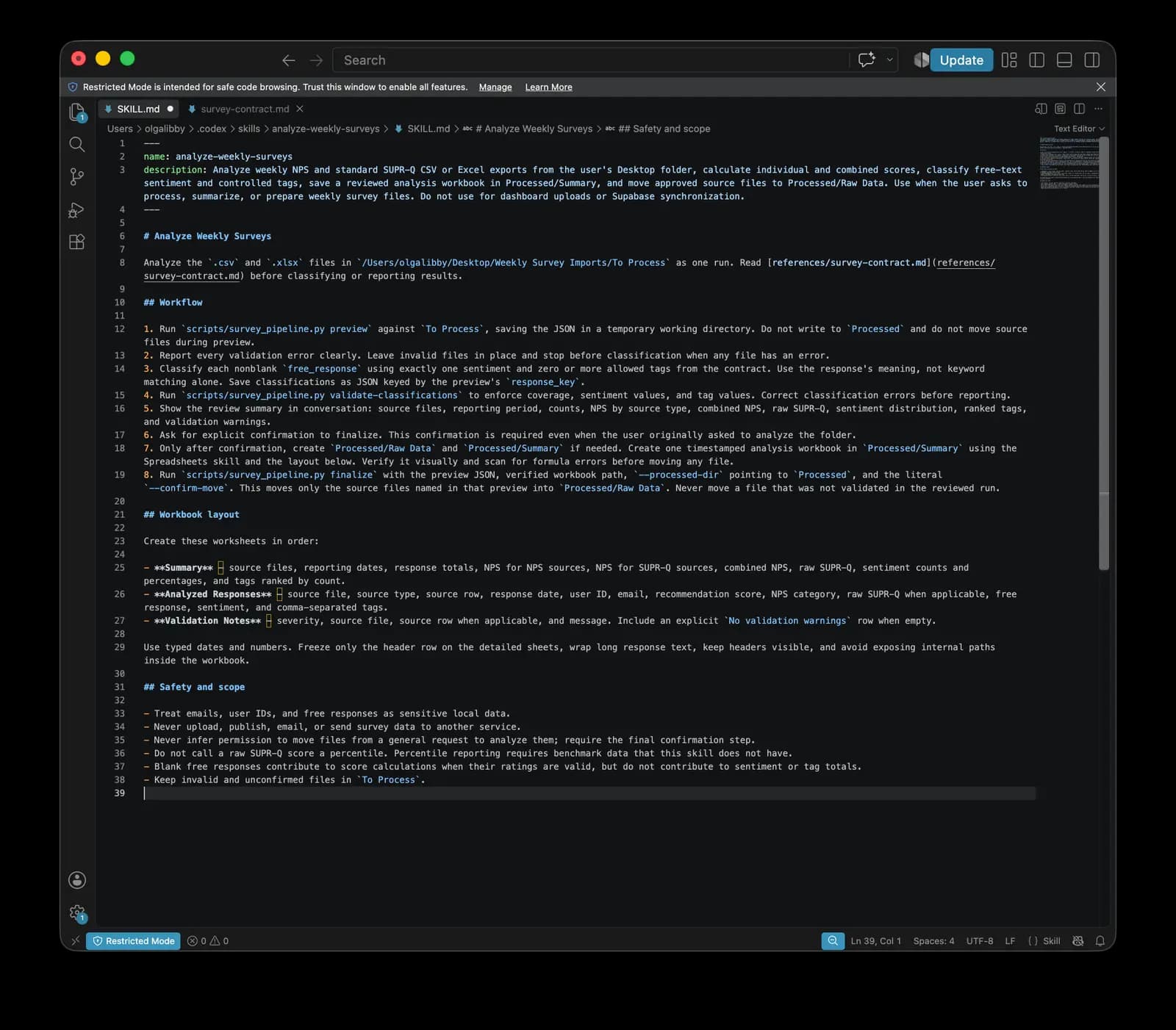
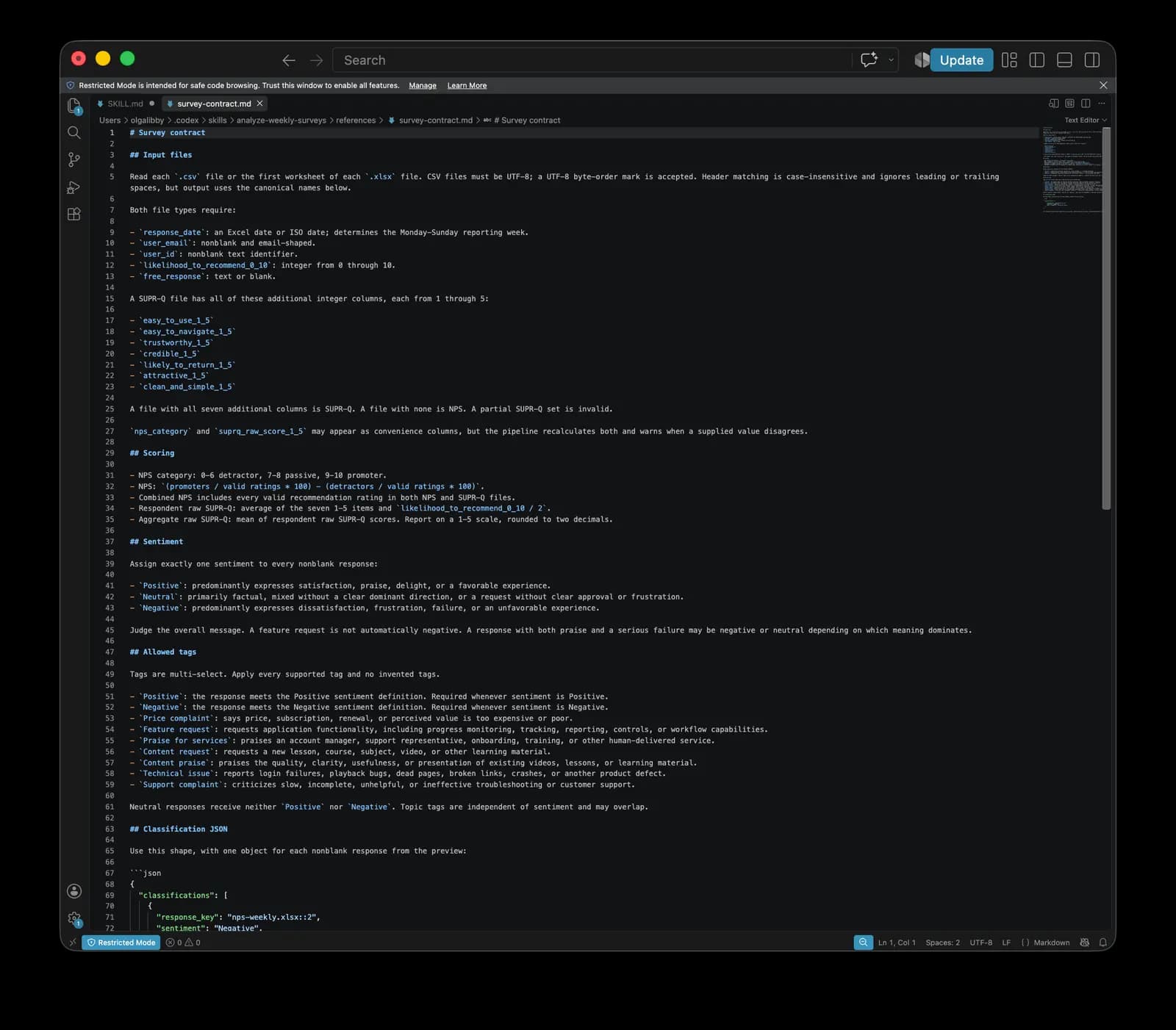
- Output Generation: Claude compiled a single report spreadsheet consolidating all scores, sentiment, and tags.
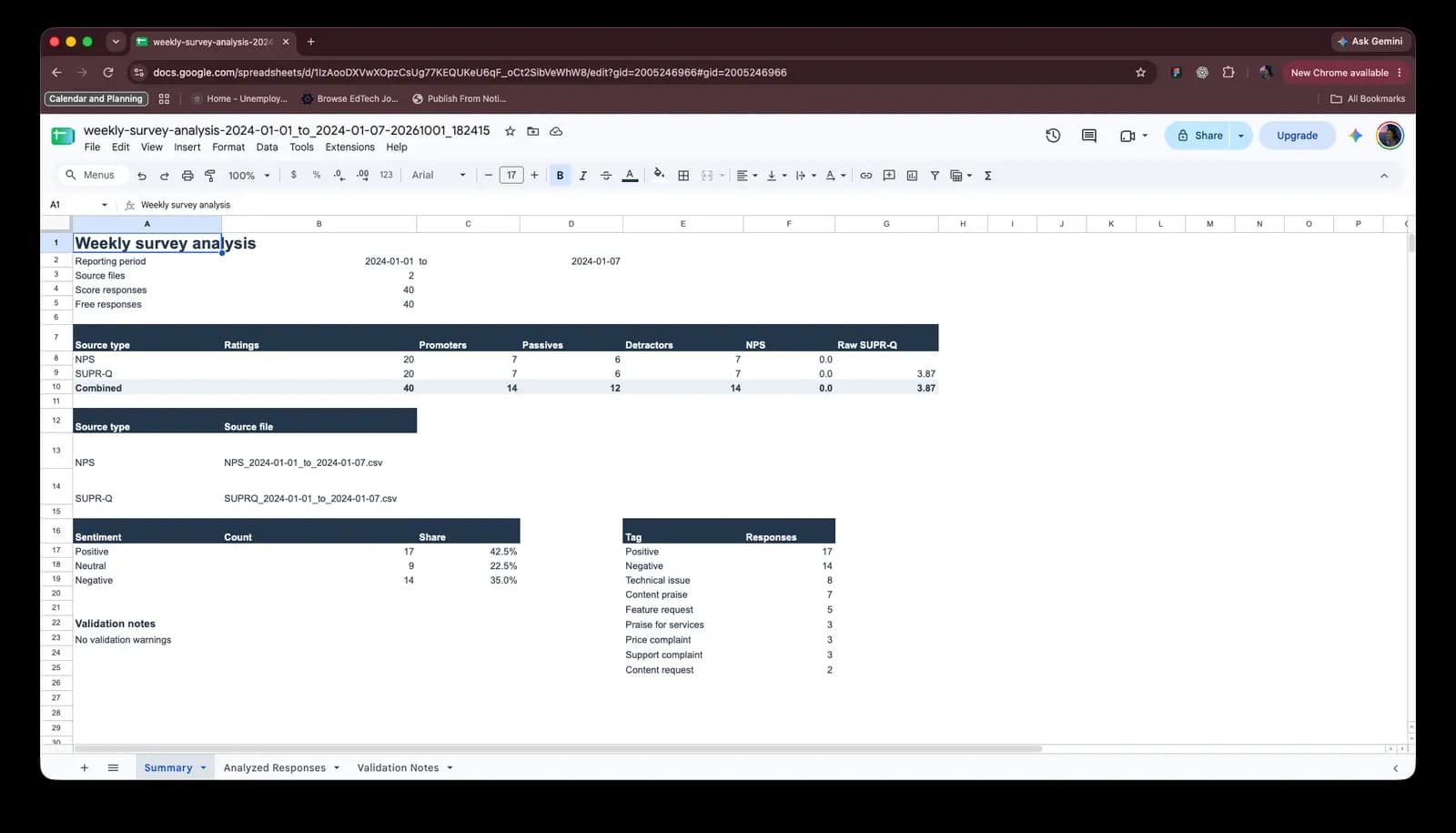
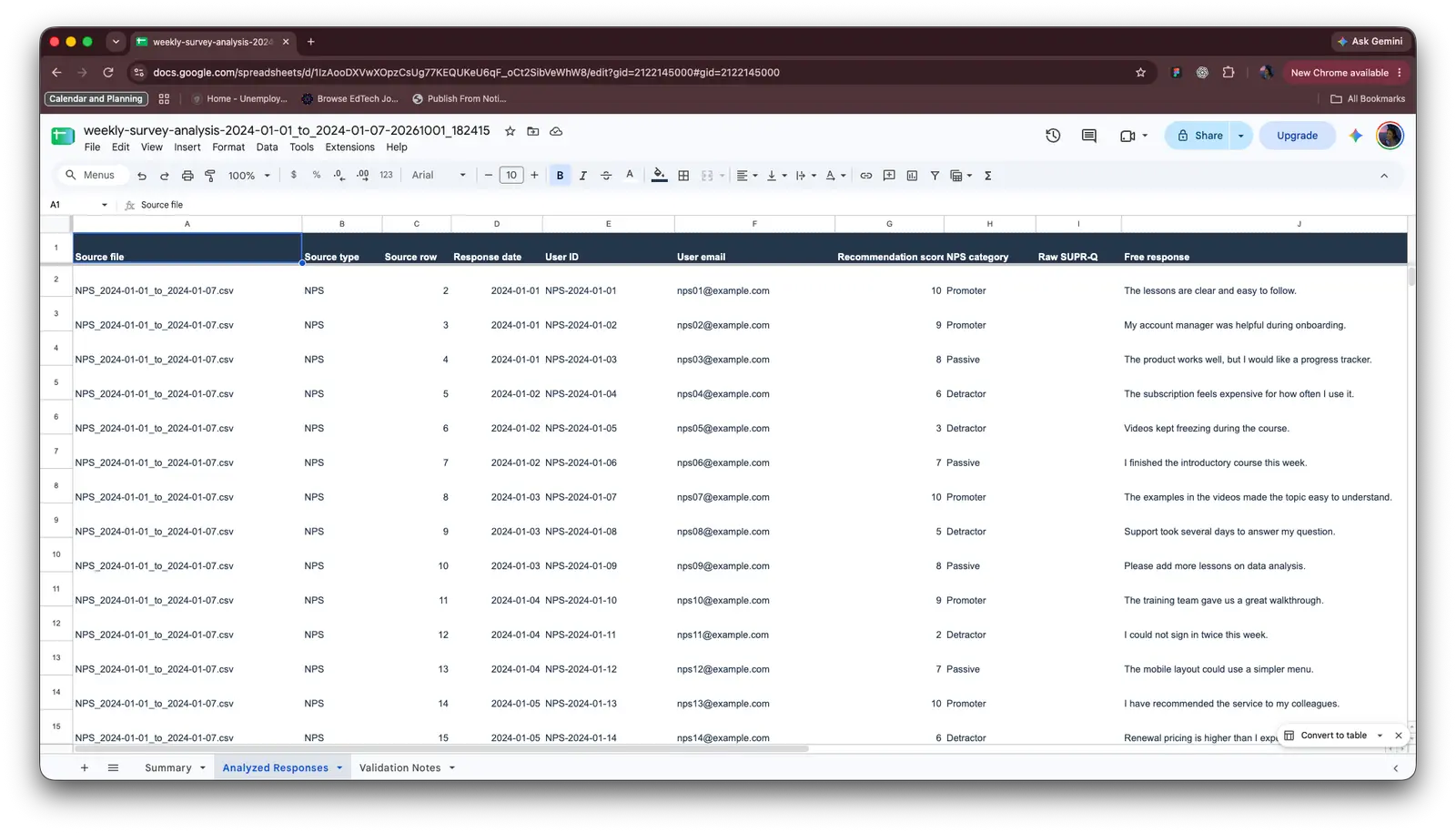
- Folder Housekeeping: Upon completion, the skill automatically moved processed files from "To Process" to a "Processed" folder, keeping the workspace clean and preventing duplicate runs.
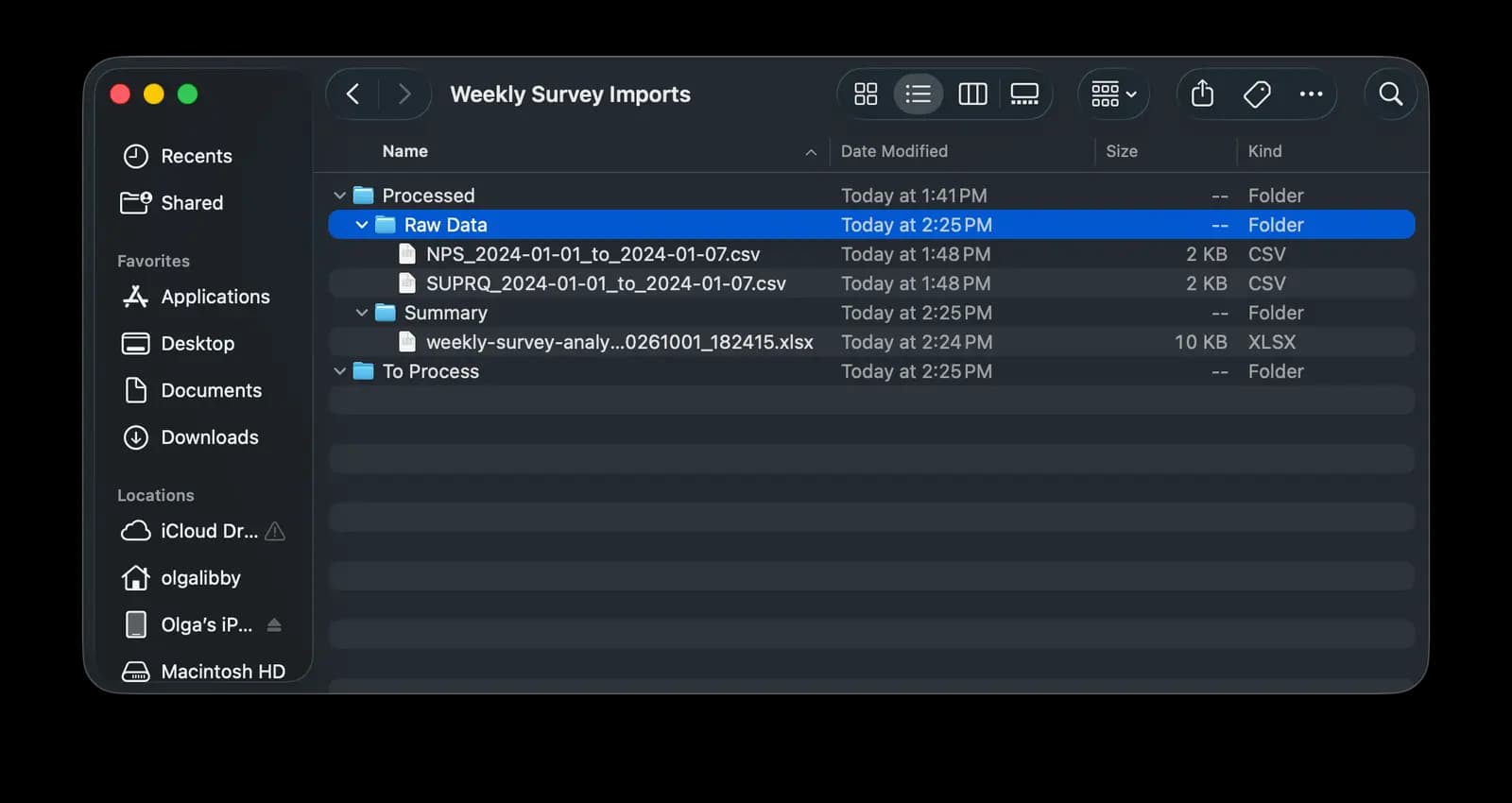
The Validation Loop (Human-in-the-Loop): The most important part of Phase 1 was not the automation. It was the evaluation. This phase served as a test drive of Claude's ability to apply the taxonomy correctly.
After each run, I reviewed the output spreadsheet line by line. Where tags were misapplied or sentiment was misread, I entered a back-and-forth loop with Claude, correcting errors and providing additional context so the skill could refine its understanding. Over time, this iterative feedback sharpened the accuracy of the tagging and surfaced edge cases the taxonomy had not accounted for.
The Result: Phase 1 delivered exactly what it needed to: proof that AI-assisted tagging is viable when paired with a well-defined taxonomy and a human reviewer. Stakeholders could see consolidated NPS, SuperQ, and sentiment data in one place for the first time, and leadership had the evidence needed to consider a more permanent investment.
04. The Solution: Phase 2 - From Spreadsheet to Shareable Dashboard
With Phase 1 validated, I had confidence in the skill itself and in my validation loop. I knew the tagging was accurate enough to be useful, and I had a repeatable process for correcting it. The bottleneck was no longer the analysis. It was the delivery. Sharing findings as a CSV or spreadsheet meant stakeholders had to parse raw data to understand what customers were saying. I wanted something they could open, scan, and actually use.
So I initiated Phase 2: building an online dashboard that would turn the analyzed output into a UI-friendly experience.
Tooling Choices: For this build, I switched between Claude Code and Codex, mostly to stay flexible around token usage. In my experience, both tools and their underlying models are pretty equal in capability. The deciding factor was usually which one I had available tokens for at the moment.
For the stack, I chose Next.js with ShadCN. Styling and branding were not a priority for this phase. I wanted speed and easy troubleshooting. Next.js and ShadCN are also frameworks that AI coding agents are highly comfortable working with, which meant less time fighting the tooling and more time iterating on the product.
The Planning Phase: I started in planning mode. I outlined the workflow and attached the Claude skill for the coding agent to review, so it understood how the data was generated and structured. The intended workflow was:
- I continue uploading files into the "To Process" folder.
- I run the skill, which analyzes and tags responses and generates the summary spreadsheet.
- The coding agent's dashboard reads off the CSV files stored in the summary folder.
The Initial Build: In my initial prompt, I outlined what I wanted the dashboard to look like. I specified two main areas:
- Scores Area: Dedicated to the scores themselves and a summary of those scores.
- Free Responses Area: Dedicated to open-ended responses, showing the overall number of responses, sentiment analysis, and a tag score breakdown. This section also included a table view of all responses submitted historically.
I also wanted a simple global filter that would let me switch between all-time results and specific weeks. The underlying logic relied on the manual weekly upload process. Each uploaded CSV would generate a separate file that the dashboard would treat as a "week" in the UI.
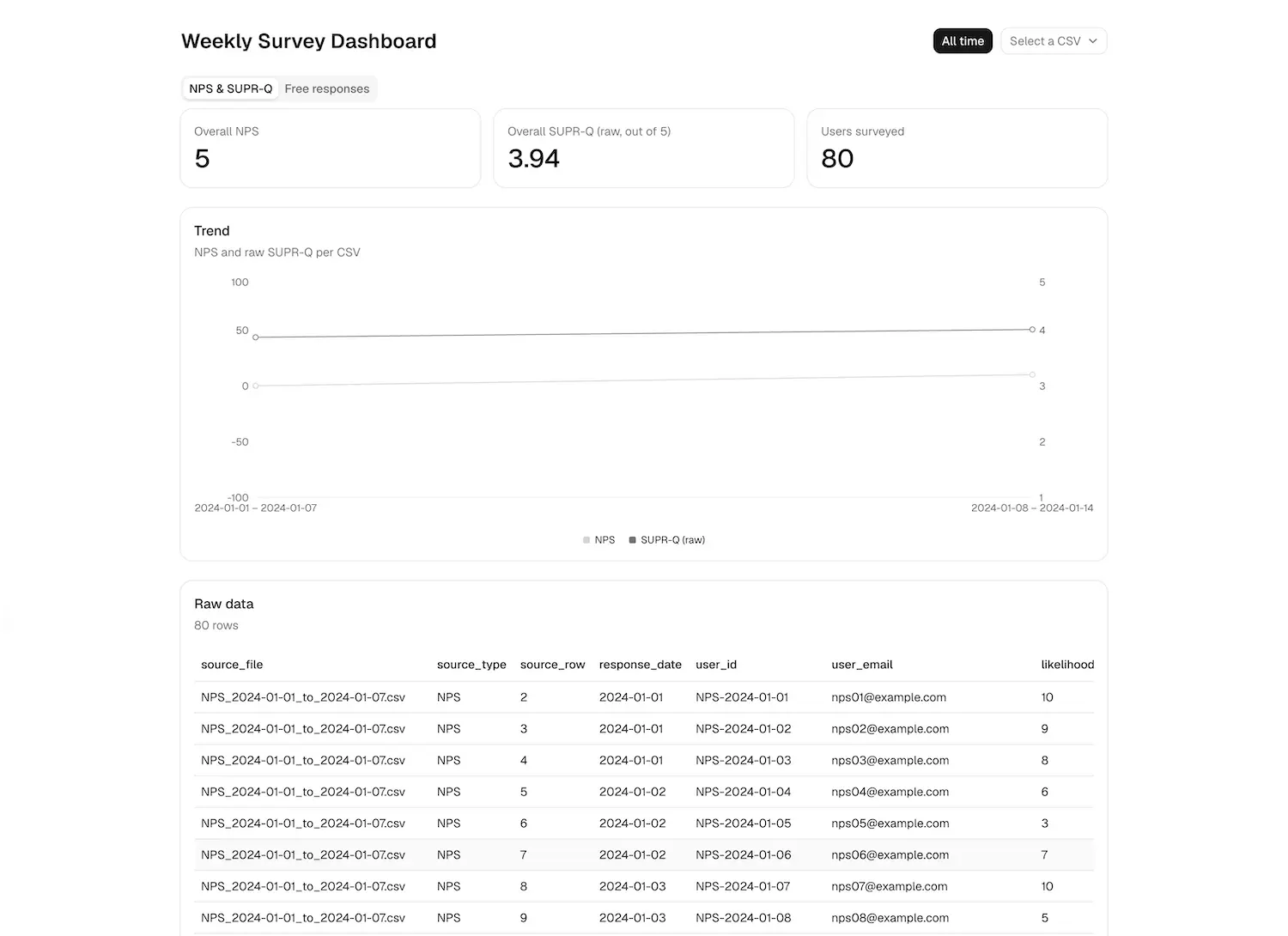
Scores Tab
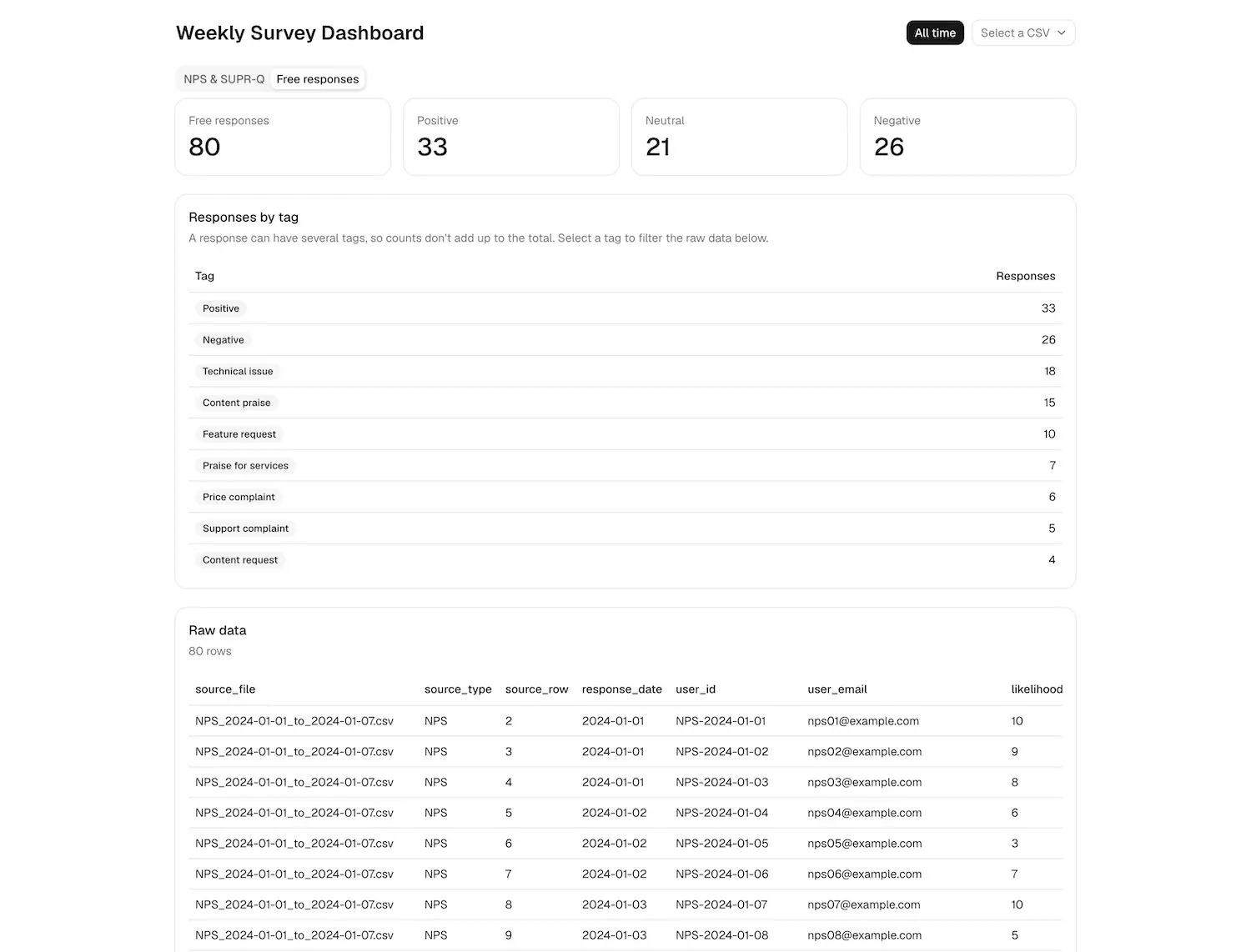
Free Responses Tab
Phase 2b: Refining the Experience Once the foundation was in place, I moved into a refinement phase focused on user experience. The initial build proved the concept, but it was not yet something a stakeholder could use without guidance. I made the following improvements:
Filtering Raw Responses: I added filter capabilities to the free responses section, so users could filter the raw table data to see only the tagged responses they cared about.
Column Customization: I added the ability to show or hide columns in the raw data table, giving users control over how much or how little detail they wanted to see.
Grouped Filters: I split the free response filters into two groups so they would be easier to scan. Sentiment tags became their own group, separate from the rest of the taxonomy tags. This made the filter panel feel less overwhelming and more logical.
Accessibility and Labels: I added labels to certain filters and page elements. This served two purposes. First, it was an accessibility improvement. Second, it gave me clear reference points if I decided to continue working with different AI tools to improve functionality later. Naming things well made the codebase easier to hand off to another agent.
Visual Trends: I added visual trend elements. When you are in all-time view, meaning all results are visible at once, there are no trends. As soon as you switch to a specific week, the dashboard shows how the selected week compares to the previous week's results. This applied to both the free responses tab and the scores tab.
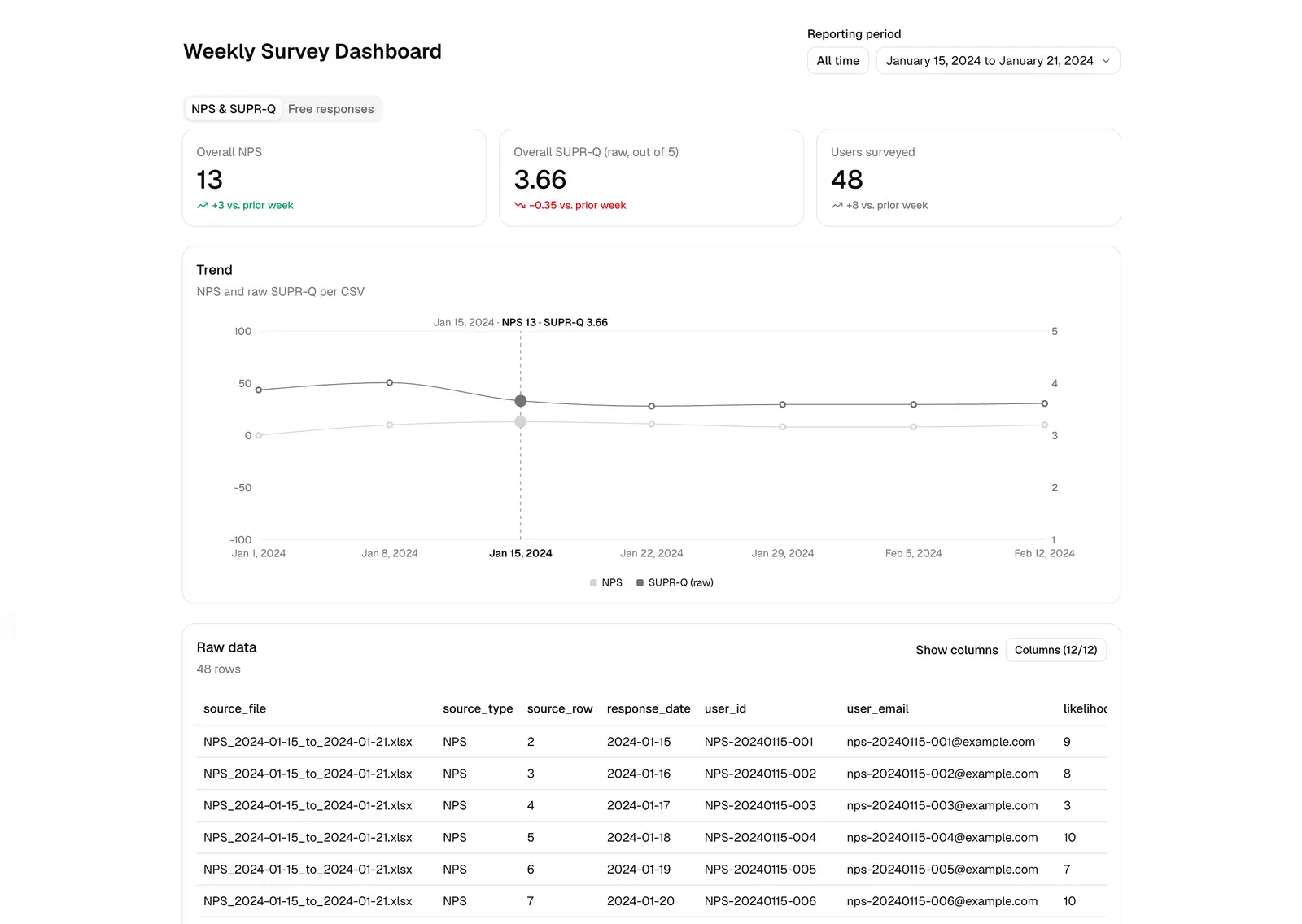
Scores Tab
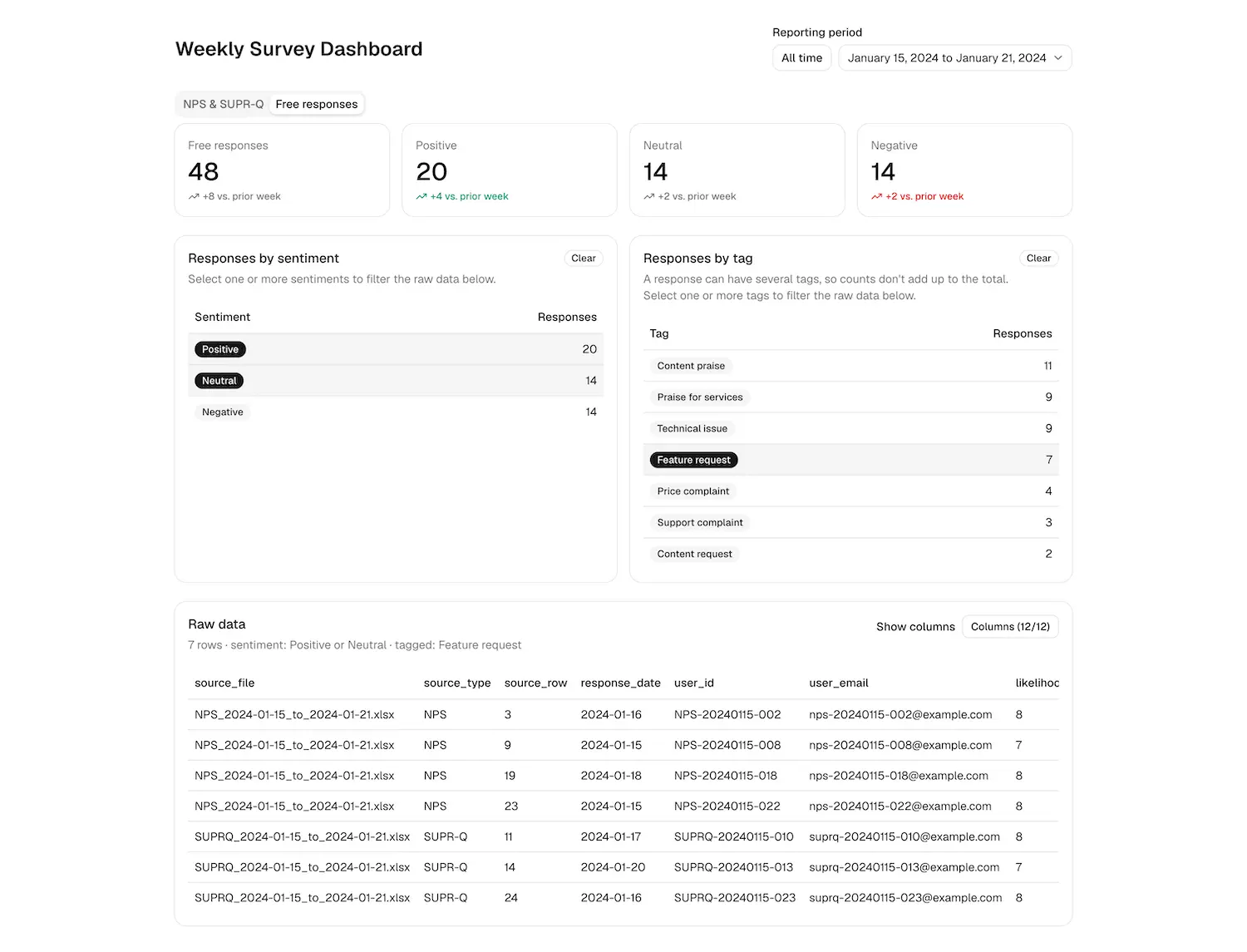
Free Responses:
The Share Feature: The last feature I added was one of the most requested by stakeholders: the ability to share results. I added a share button that opens a sidebar where users can:
- See a generated summary they can manually copy and paste into chat or email.
- Copy a link to the dashboard that opens the results in the filtered state they were viewing.
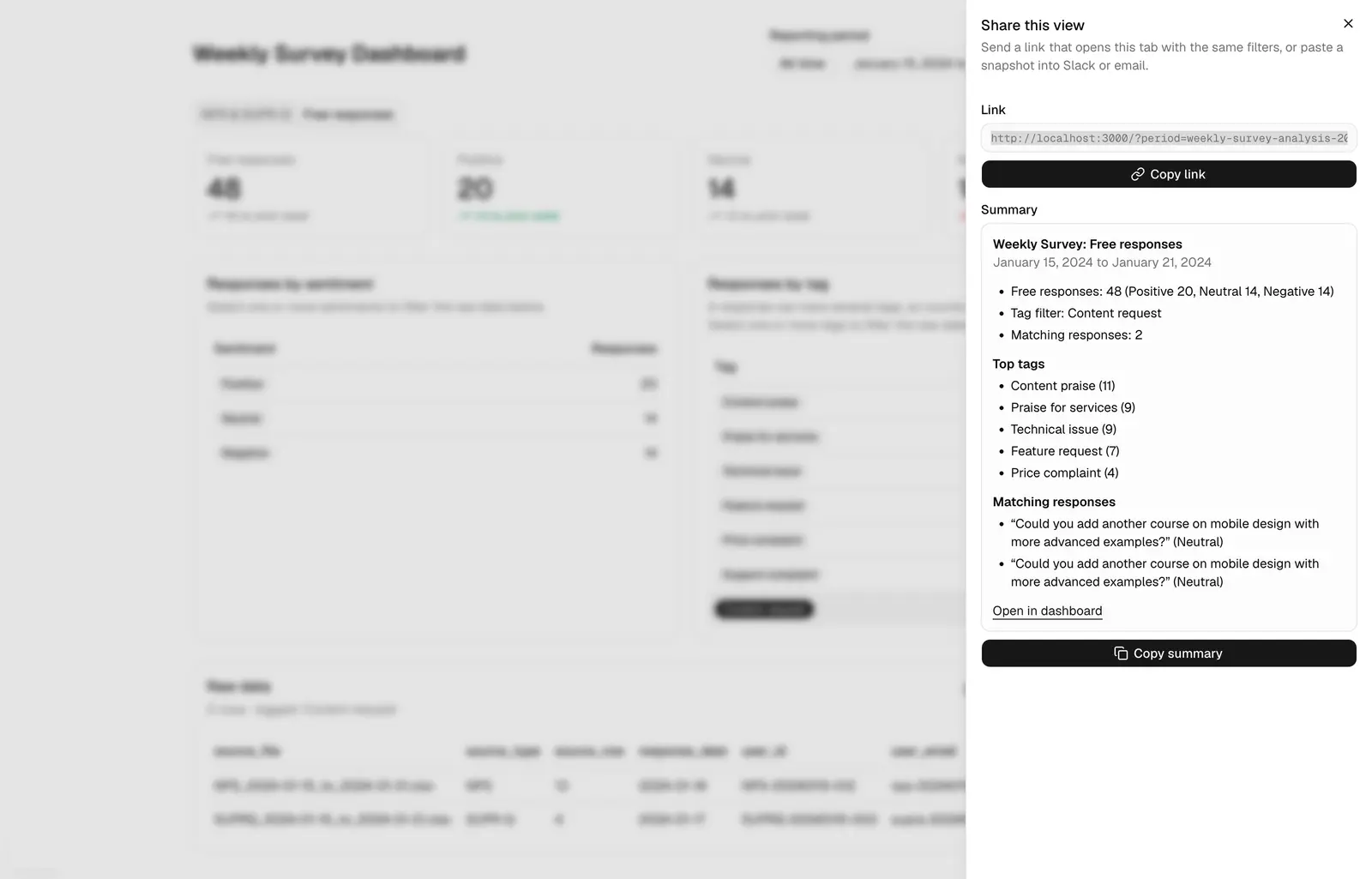
The Result: Phase 2 turned a validated analysis pipeline into a product stakeholders could actually use. What was once a spreadsheet only I could interpret became a self-serve dashboard with filtering, trend comparison, and built-in sharing. The manual upload step remained, but it was now a minor input rather than the entire workflow.
Phase 2b: Usability Testing and Further refinements
Once Phase 2 was live, I put it in front of stakeholders and gathered feedback. Three themes emerged, each pointing to a gap between what I had built and what people actually needed.
Feedback 1: Navigation Was Easy to Miss

The first piece of feedback was that the tabs were not prominent enough. Users were missing entire sections of the dashboard because the navigation did not draw their eye. The solution was to introduce a sidebar, which gave the dashboard a more traditional navigation feel and made it easier to move between sections with confidence. This was a small change structurally, but it had a meaningful impact on how quickly users could orient themselves and find what they were looking for.
Feedback 2: No View of Overall Trends
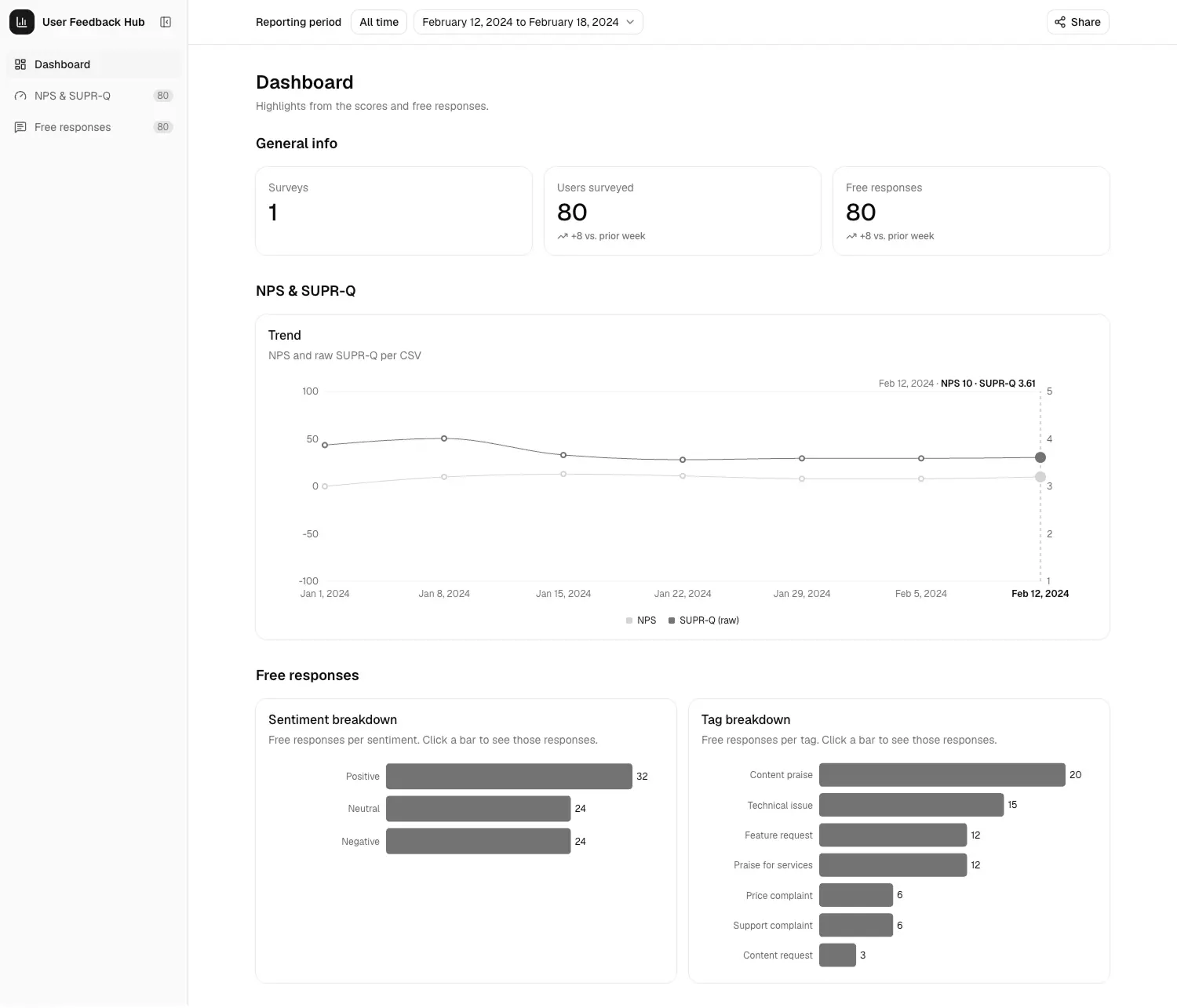
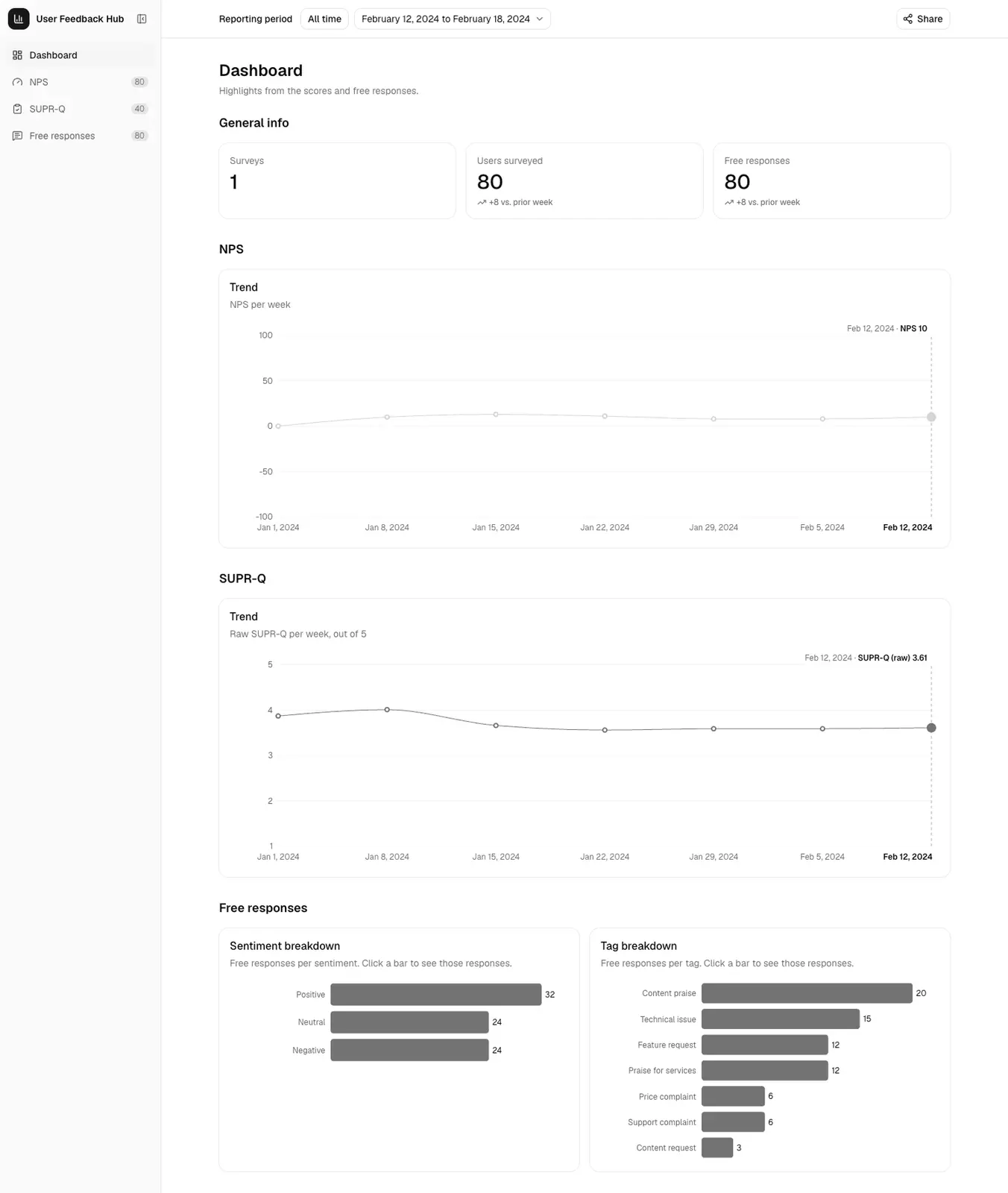
The second piece of feedback was that it was hard to see total trends across the entire set of surveys. Users could drill into individual weeks, but they had no single place to see the bigger picture. To solve this, I introduced a dedicated dashboard page that pulls high-level information from both the scores page and the free responses page. This gave stakeholders a starting point, a summary view they could check first before deciding where to dig deeper.
Feedback 3: Wanting More Granular Score Breakdowns
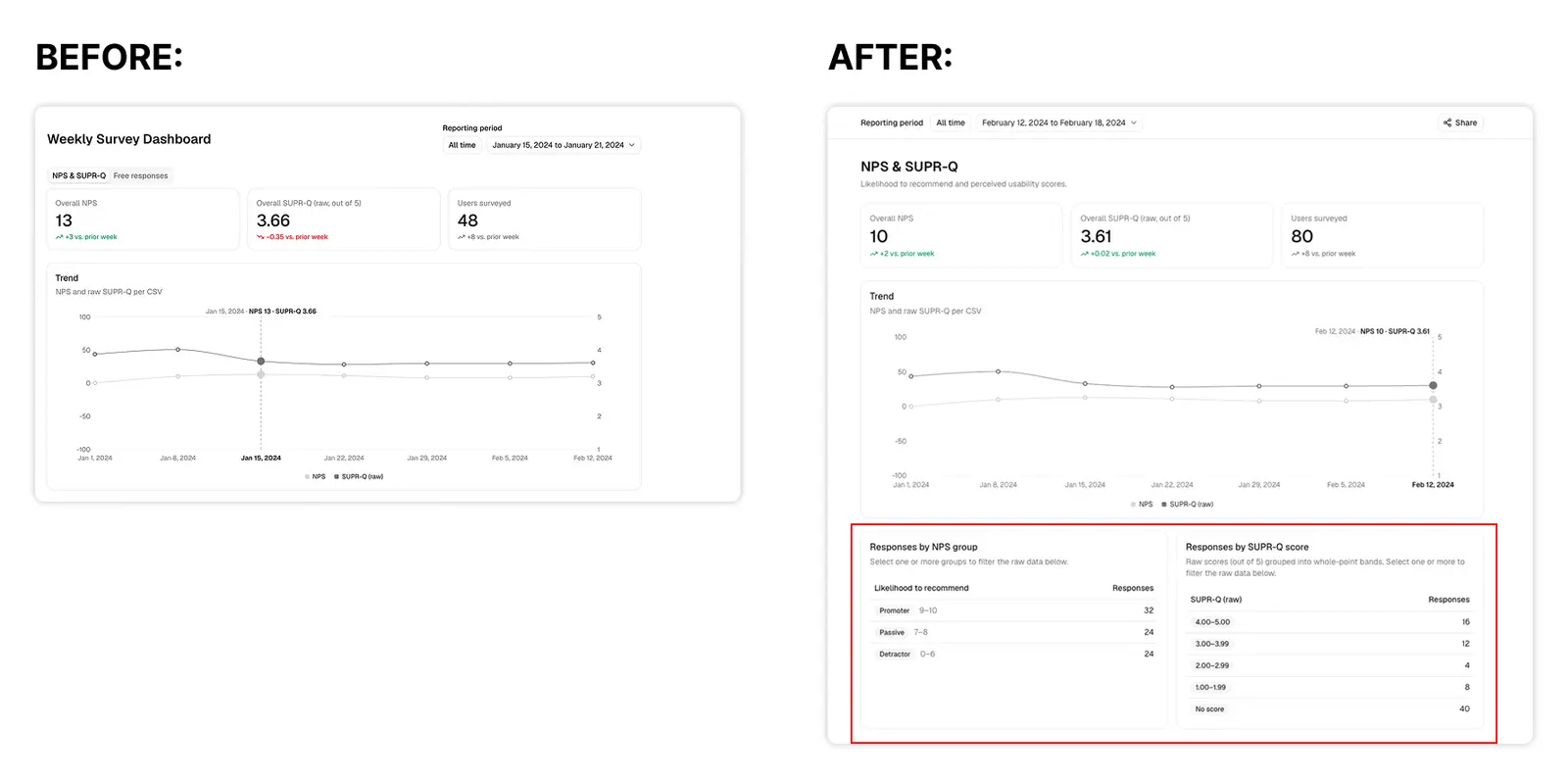
The third piece of feedback was that people wanted a more detailed breakdown of NPS and SuperQ scores by specific groupings. To address this, I added additional stats to the scores page. For NPS, the dashboard now shows how many respondents fall into each bucket: Promoters, Passives, and Detractors. For SuperQ, it shows the breakdown by score group. This gave stakeholders a clearer picture of not just the average score, but the distribution behind it.
Feedback 4: Splitting NPS and SuperQ Into Their Own Sections
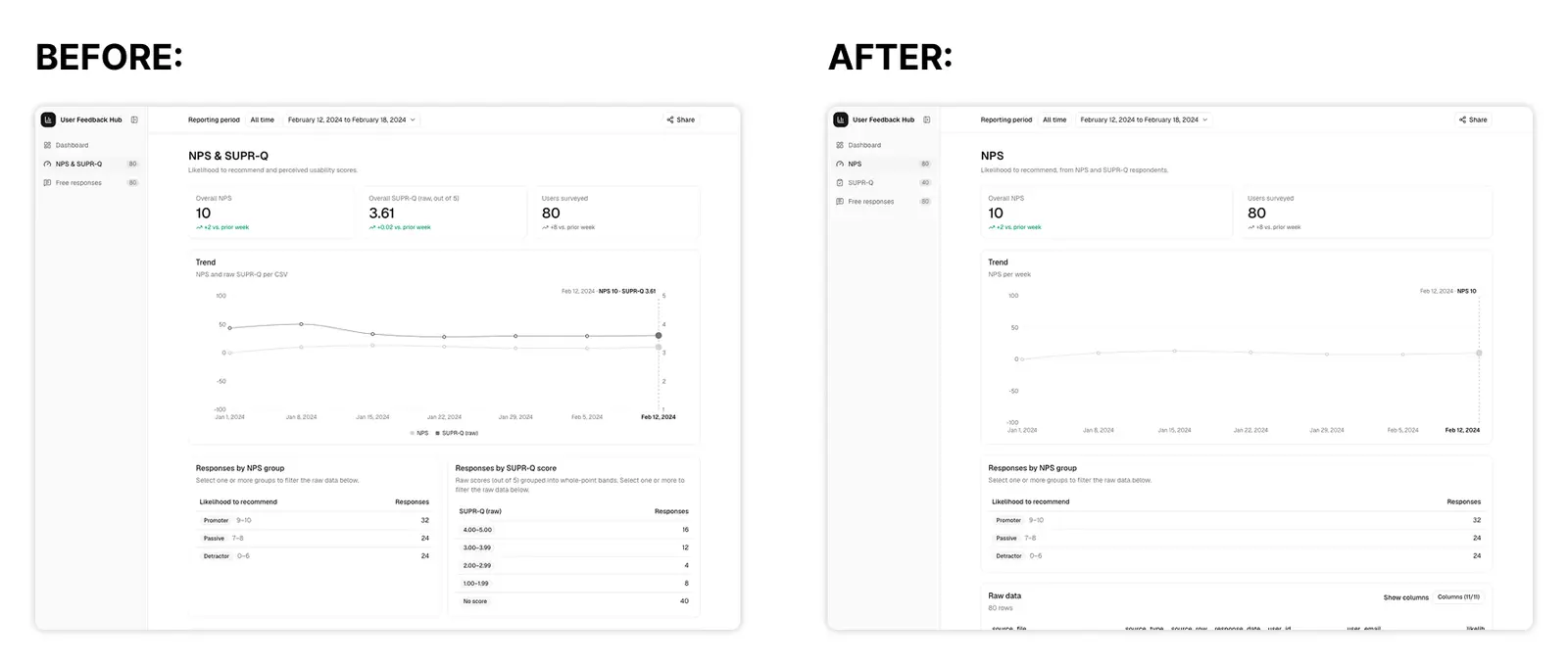
The fourth piece of feedback was a desire to split NPS and SuperQ into their own separate categories rather than keeping them on a shared page. Two things drove this decision. First, the product team was exploring adding other surveys to the mix, and a single combined page would quickly become bloated as new surveys were introduced. Splitting them now meant the architecture could scale cleanly later. Second, the customer support team was primarily focused on NPS scores and feedback, referencing other surveys only as needed. For them, a dedicated NPS page meant they could complete their tasks without distractions.
One technical detail I wanted to preserve during the split: the 10th question in SuperQ overlaps with the NPS question, "Would you recommend this app to other people?" To avoid losing that connection, I made sure the 10th SuperQ question still appears on the NPS score page, so anyone reviewing NPS data can see the related SuperQ response without switching pages.
Feedback 5: Adding Search bar for custom searches
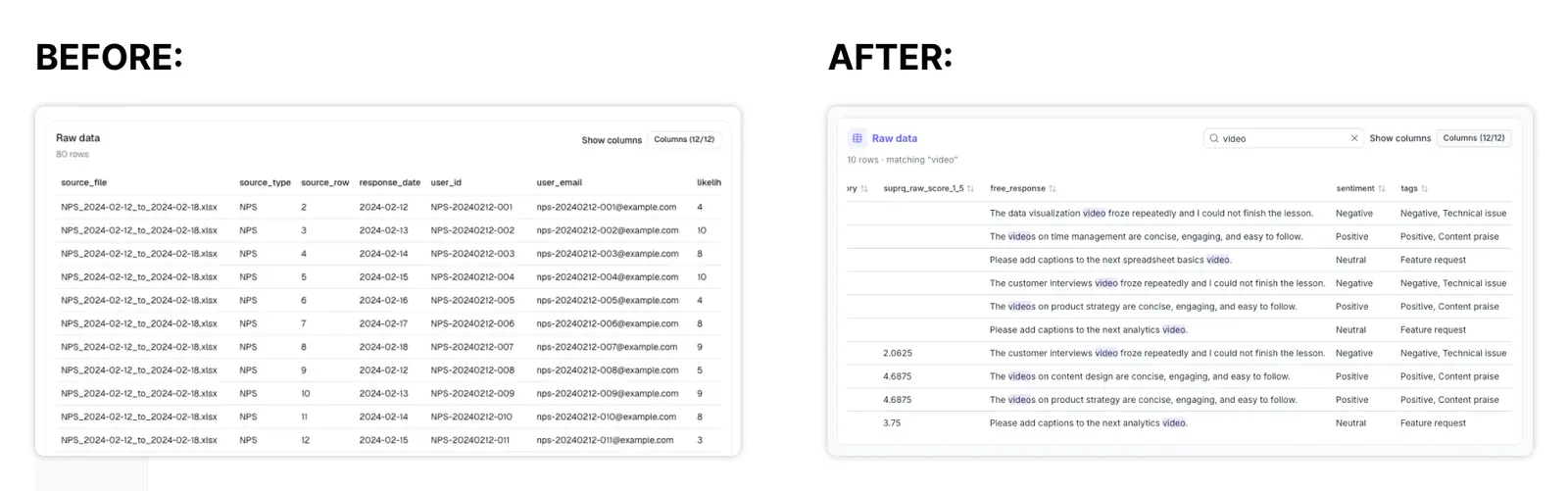
The fifth piece of feedback, and one of the biggest requests across all stakeholders, was the ability to search free responses directly. The global taxonomy was useful, but it could not capture everything. Stakeholders wanted a way to run custom searches for terms and phrases that fell outside of the established tags. This would let them investigate feedback that the taxonomy did not account for and form hypotheses about emerging trends based on raw user language rather than predefined categories.
To address this, I added a search capability to the free responses section. Users can now type in their own queries and instantly filter the response table to matching entries. This turned the dashboard from a purely structured reporting tool into something closer to a research tool, giving stakeholders the flexibility to explore the data on their own terms and surface signals that might otherwise have gone unnoticed.
The Result:
Phase 2c was a reminder that a dashboard is never finished the moment it ships. The feedback I received was not about broken functionality. It was about discoverability, context, and depth. Each update came directly from watching real people use the tool, and each one made the dashboard easier to navigate, easier to interpret, and more useful for the decisions stakeholders were trying to make. The search feature in particular closed the gap between structured tagging and open-ended exploration, giving stakeholders a way to chase down the questions the taxonomy could not answer.
05. Phase 3: UI and UX Improvements
With the functional feedback addressed, I turned my attention to the look and feel of the dashboard. This phase was as much a learning opportunity for me as it was a benefit to the company. We were already exploring options for replacing our Angular design system with something more lightweight, so this project gave me room to experiment with modern tooling while still delivering value.
Part 1: Theming and Component Refactoring
Before the theme was applied
After the theme was applied
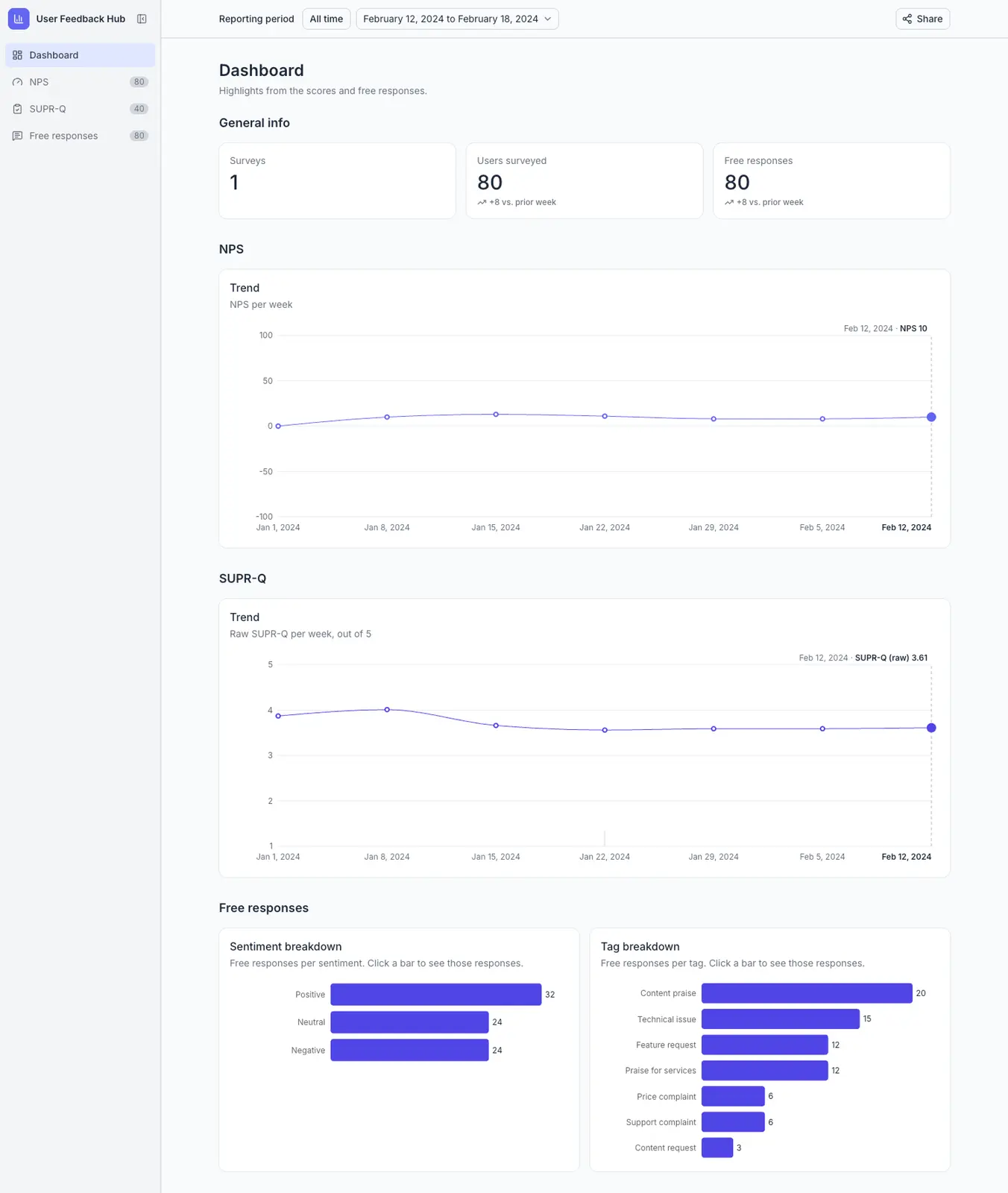
I started by exploring styling options and trying out of the box libraries I had found. I applied multiple custom styles sourced from TweaksCN, ultimately settling on one that matched closely with the brand. I did not want to go too deep into building a fully customized theme, and I did not want to connect this project to the existing company design system. I wanted to move fast and stay autonomous.
I was pleasantly surprised by how quickly I could switch themes and how much customization was possible without a heavy lift. One thing I wanted to avoid was creating a pile of custom components that would be hard to maintain. So I spent time refactoring the components so that the blank slate matched out of the box ShadCN components. This meant I would not have to apply blanket themes and then tweak one or two custom components as I went.
Not many components ended up being fully custom, but this refactor did establish a few rules in my agents.md file. I specified that ShadCN components should always be used first before creating custom components or adding custom variables. This kept the codebase consistent and made it easier for an AI agent to work within the project without drifting.
Part 2: Rethinking the Reporting Period Selector
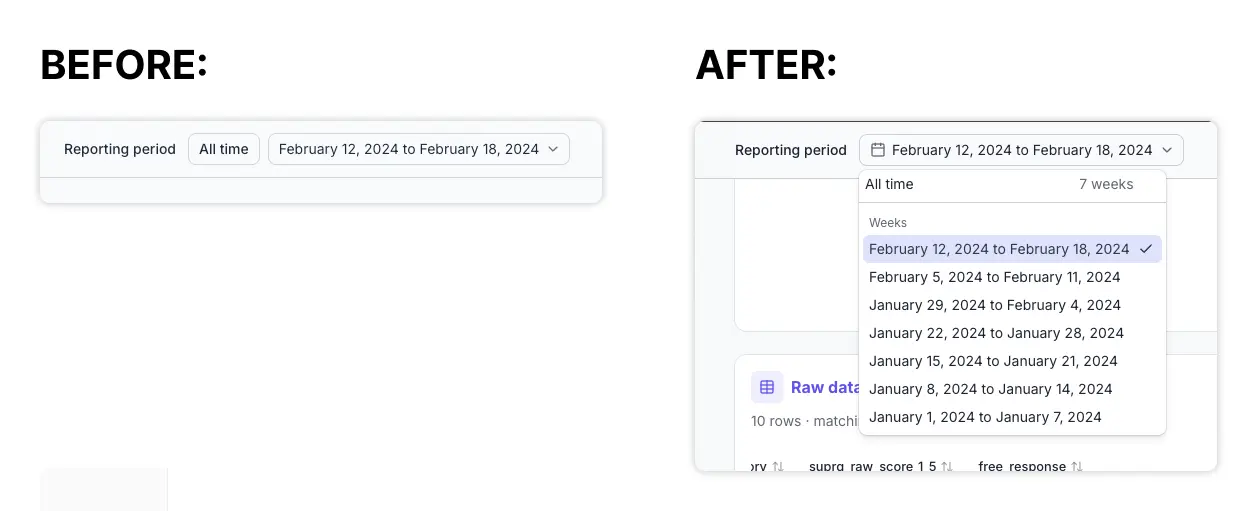
After the initial styling and refactoring, I noticed that the reporting period section at the top of the page was not as intuitive as it needed to be. For example, it was not immediately clear which period was selected.
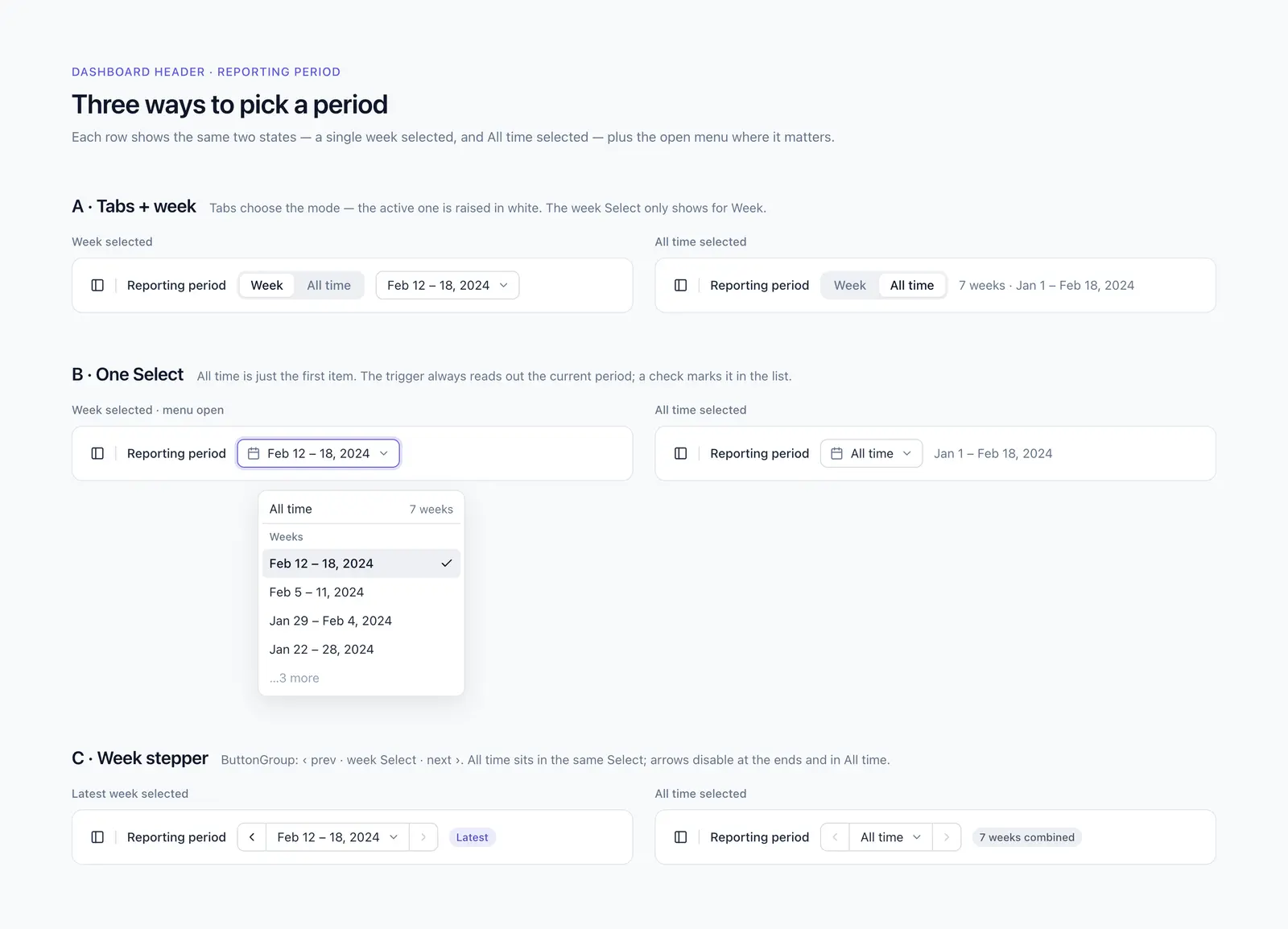
I spent time exploring options in Paper. I described what was not working and outlined different directions I was considering. Paper generated a few options for me to choose from. After some back and forth and refining the designs in Paper, I settled on one option and prompted Claude to update the code to match the design I had generated.
This was also my first real opportunity to explore Paper, and I was pleasantly surprised by both the speed and the quality of the results.
Part 3: Sidebar Controls
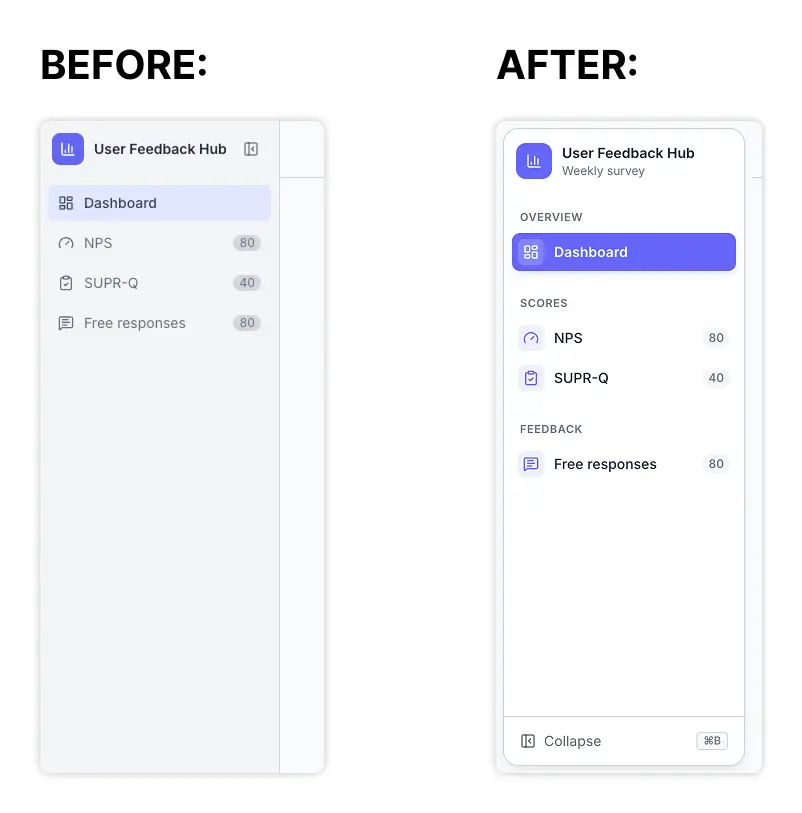
Another area I was not happy with was the sidebar. The lack of structure and navigation was not ideal, and I did not love how far removed the expand and collapse control was from the sidebar itself.
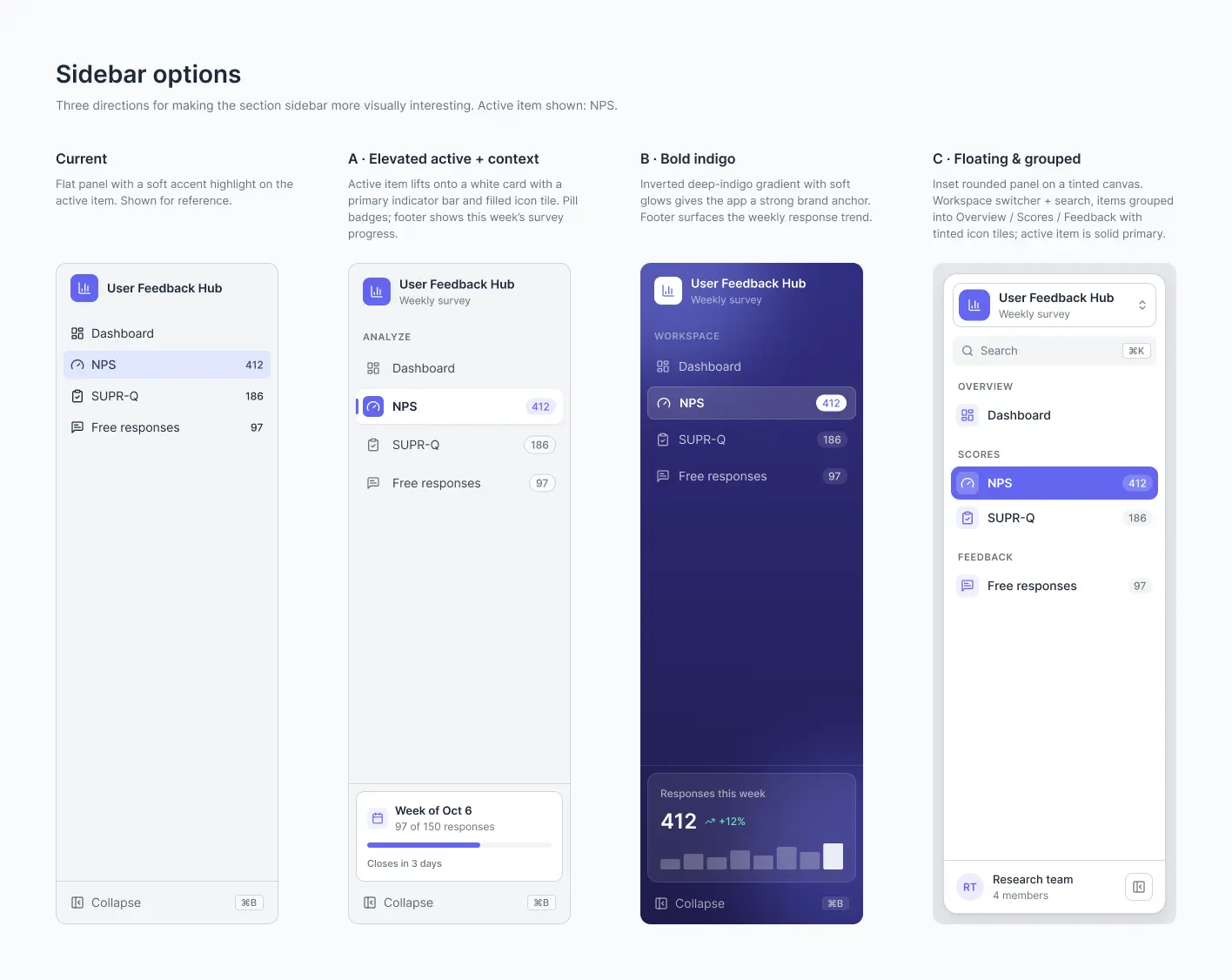
This time I used Figma and generated three different options. I iterated on the solutions, refining and settling on a final design, then prompted Claude to update the layout based on the Figma exploration.
Comparing Paper to Figma, I found both to be very comfortable and easy to use. In terms of designing and pixel pushing, they felt equal. That said, my impression was that working in Figma consumed more tokens. It was not necessarily visible in my final work or reflected in my token usage, but going forward I am considering switching to Paper for agentic enabled design.
Part 4: Adding Visual Interest to the Layout
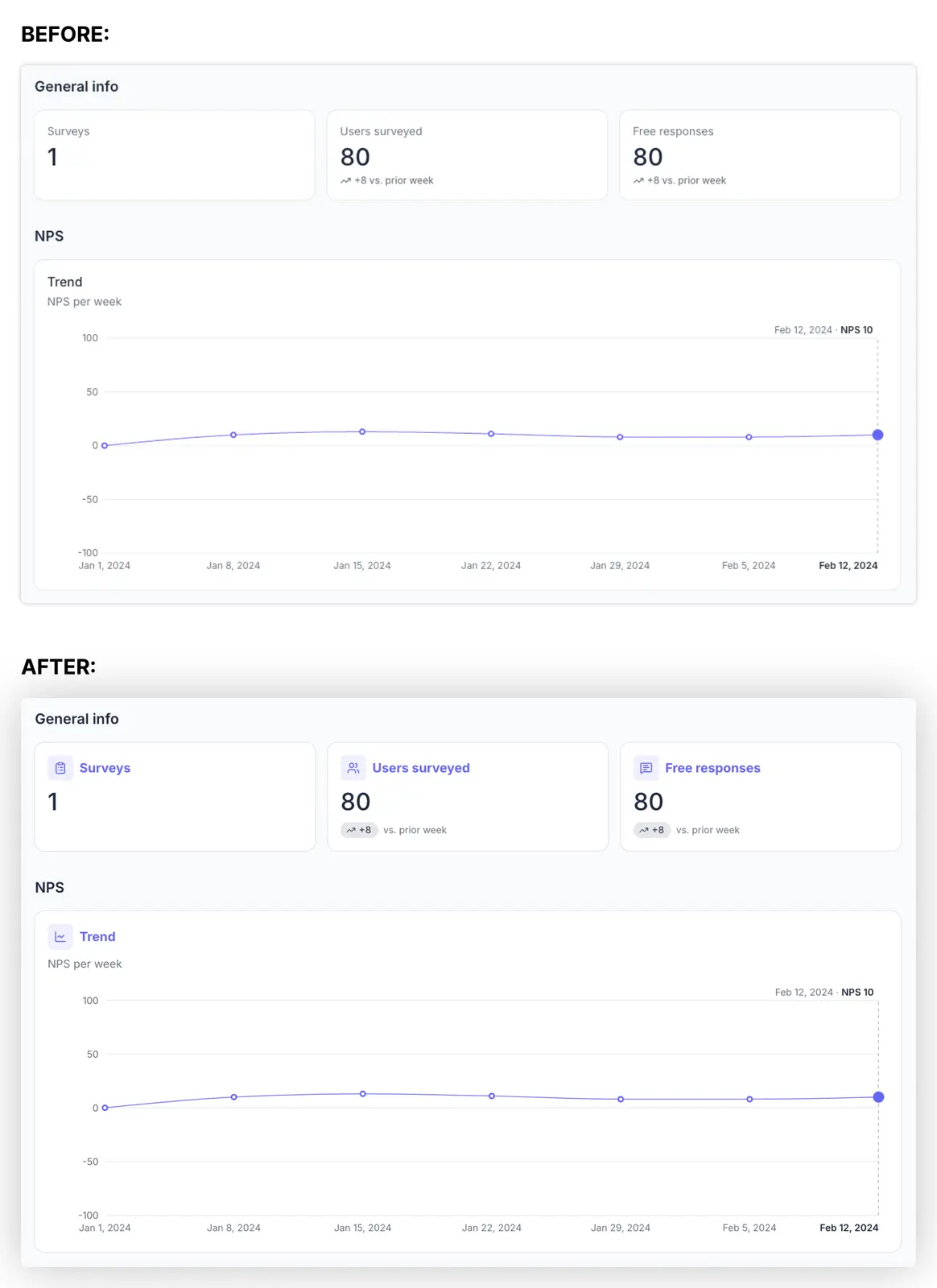
Finally, I wanted to add a bit more visual interest to the layout itself. I worked in both Figma and Paper to tweak and design cards so the dashboard felt a little more playful and interesting to look at, while also anchoring key elements on the page.
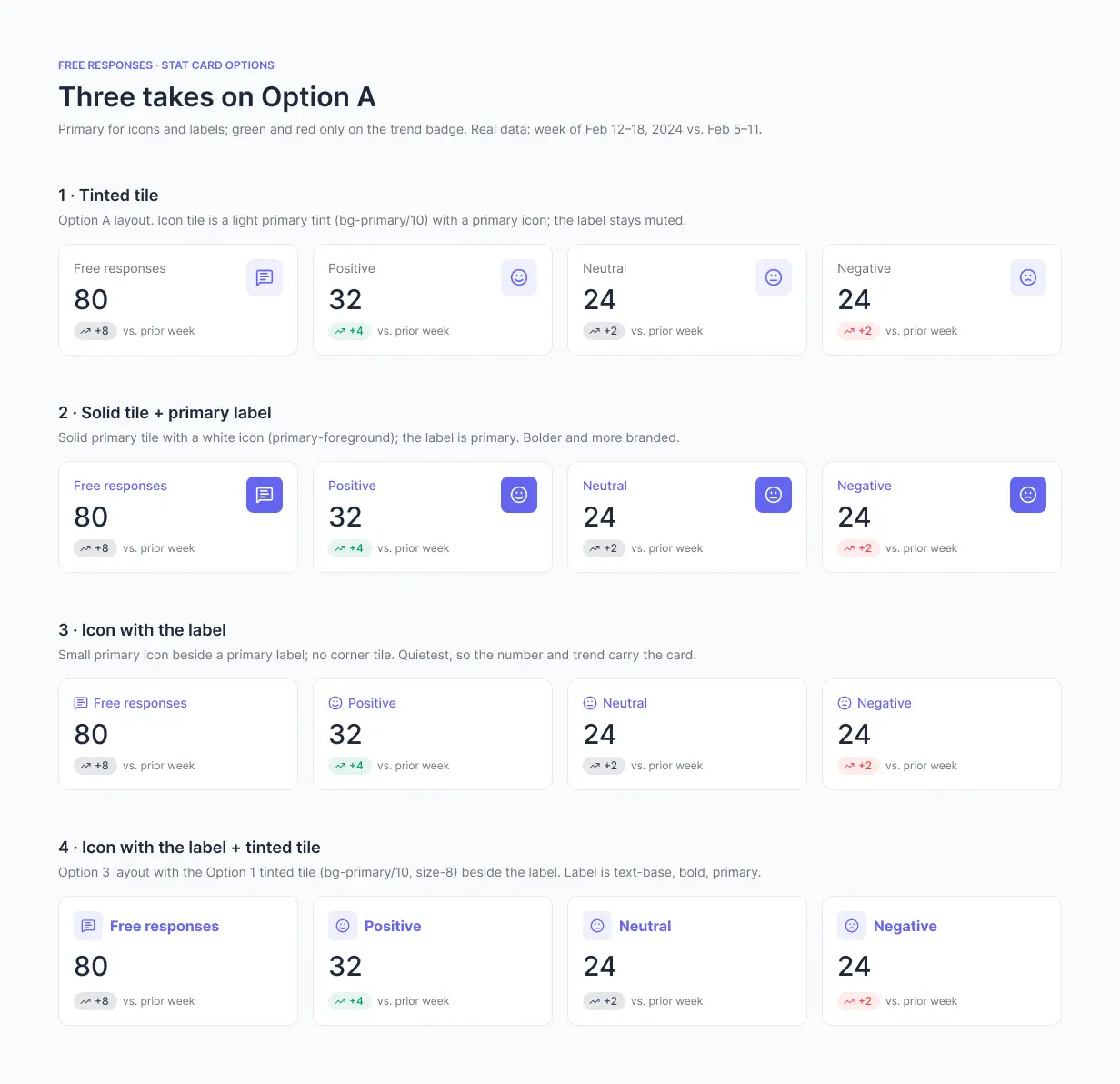
This part took the longest in terms of back and forth because I was going for a specific hierarchy, and balancing that with visual interest was a real challenge. In the end, I am happy with the results. I followed the same process as before: prompting to generate three designs, refining from there, pixel pushing, and finally asking Claude to implement the designs in code.
The Result: Phase 3 pushed the dashboard from functional to polished. The theming work gave the project a lightweight, modern look without tying it to the existing design system. The reporting period selector became clearer, the sidebar became easier to navigate, and the cards added a layer of visual interest that made the dashboard feel intentional rather than utilitarian. Just as importantly, this phase let me test new tools and workflows that could inform how we approach design tooling at the company level.