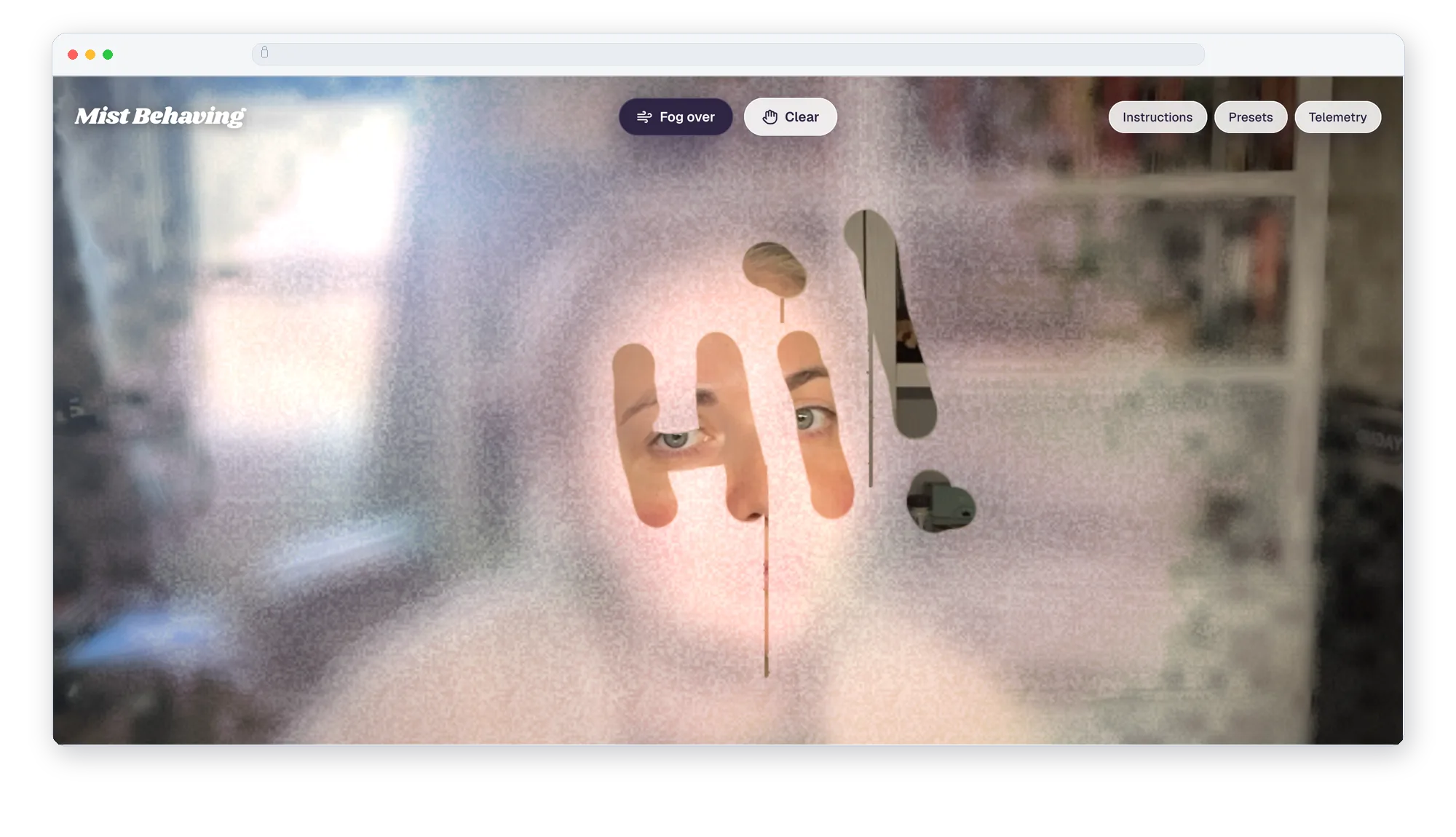
A steamed-up mirror in the browser. You breathe at your webcam to fog the glass, raise a finger to write in it, and sweep an open palm to wipe it clear. I wanted to experiment with bringing a tactile experience into the digital world. Drawing on a fogged-up mirror is something I did as a kid, and, let's be honest, still do most mornings right after a shower.
What I built
- Breathe: face tracking reads an open, rounded mouth as a breath, and a warm puff of fog blooms out from where your mouth is. The breath has to hold for a moment, so talking or smiling doesn't fog the glass.
- Draw: point one finger and your fingertip becomes the pen. Each line pushes water out to its edges, where it gathers into beads, and the heavier drops let go and run down the glass.
- Wipe: an open palm clears a wide streak and leaves a thin, uneven film of water behind it.
- No camera: hold Space to breathe and drag to draw, over a stand-in room of warm lamps and a dim window.
- Phone experience: the Fog over and Clear buttons move down under your thumb, and the panels start closed so the glass is clear when you arrive.
Customization
- Bathroom mirror: warm, thick steam that lingers.
- Cold car window: a blue chill, ice ferns that grow into the fog, and beads that run faster.
- Mirror camera: flip the view like a real mirror.
- Fog over and Clear: fog the whole pane at once, or start again with clean glass.
What I learned
- Gestures need patience built in. A gesture only counts once it has held for a few frames, and the fingertip is smoothed so lines stay steady. Without that, every twitch of the hand broke a stroke.
- The water sells the effect more than the fog does. Beads at the edge of a line and drips running down are what made it read as glass rather than a blur filter.
- Each glass is a handful of numbers: tint, density, evaporation, how soon drops let go, and frost. Adding a new one is mostly tuning.
Working with OGL
This was my first time using OGL, a tiny WebGL library, and I was blown away by the quality of the output. It stays out of the way: a renderer, a full-screen triangle, and a shader program are about all it asks for. That leaves the shaders to do the real work.
- The fog itself lives on the GPU, in a texture that updates every frame with fog density, standing water, and wiped marks.
- The glass is drawn in one pass on top of the camera: blurred haze, refracting beads and drips, and frost on the car window.
- The pearlescent intro background is a single shader too, with a soft iridescent bloom that follows your cursor.
It's light, fast, and gave me far more polish than I expected from a 3-hour prototype. I'll be reaching for it again.
It also reminded me to be thorough with QA. Viewing the experience on an older Mac uncovered rendering issues with the intro background that I'd never have seen on my own machine. Testing on more than one device is now part of how I'll work with shaders.
Privacy
All face and hand tracking runs in the browser. The video stays on your device, and nothing is recorded or uploaded. The intro screen says so next to the camera button, because asking for a camera is a lot to ask of a stranger.
Toolkit
- Framework: Next.js 16, React 19, TypeScript, Tailwind CSS.
- Tracking: MediaPipe face and hand landmarkers.
- Rendering: OGL (WebGL) with custom GLSL shaders for the fog, water, and frost.
- Prototyping: Claude Code.